
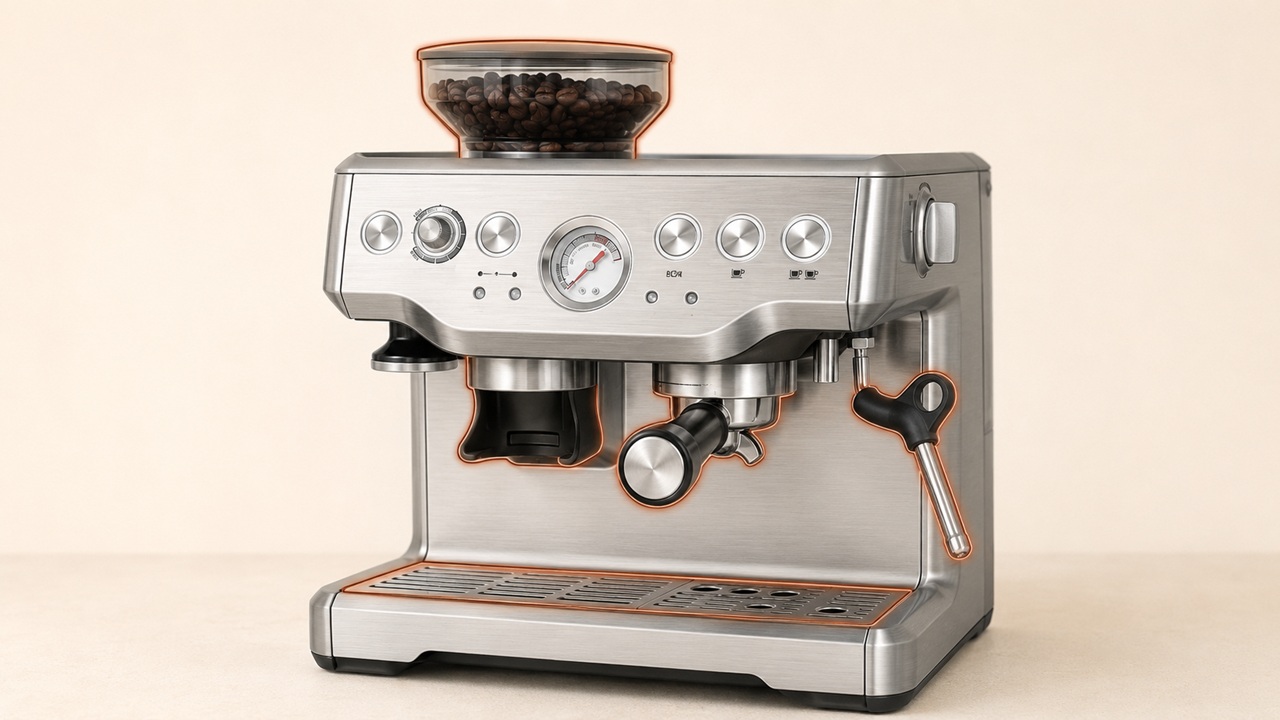
Most Breville Barista Express BES870 problems can be narrowed down by separating a machine-side water problem from a coffee-preparation restriction. The same checks apply to the BES870XL. Fill and firmly reseat the water tank, return the STEAM/HOT WATER dial to STANDBY, wait until the machine is ready, remove the portafilter and run a short 1 CUP water purge. A normal flow without the portafilter points toward the grind, dose, tamp or filter basket; little or no flow points toward the tank, scale buildup or a fault that may need service.
This guide covers the BES870 series, including the BES870XL designation commonly used in North America. It does not cover the earlier BES860, the Barista Pro or the Barista Express Impress. Check the rating label on your machine before ordering parts or following region-specific electrical advice.
Safety first: Never remove the portafilter during extraction or run the machine with an empty water tank. Switch off, unplug and allow the machine to cool before cleaning a blockage or removing a user-removable part. Stop immediately for a damaged cord, burning smell, smoke, repeated breaker trips or water entering the housing.
Start with this five-minute BES870 check
- Inspect before powering on. Make sure there is no damage, burning smell or unexplained water around the power cord or beneath the housing.
- Fill and reseat the water tank. Push it fully down into its locked position. Do not use distilled or demineralized water; Breville recommends cold, preferably filtered water.
- Check both control positions. Lock the bean hopper in place and set the STEAM/HOT WATER dial to STANDBY.
- Wait for the ready state. The POWER light flashes while the machine heats. Test it only after that light stops flashing and the control-panel lights illuminate.
- Test water without coffee. Remove the portafilter, place a cup beneath the group head and press 1 CUP briefly. Then test the hot-water outlet separately.
- Test steam and grinding separately. Wait until the STEAM/HOT WATER light stops flashing before judging steam output. Grind only a small dose while listening for an unusual sound.
Do not keep repeating a no-flow test. The result of one short test is enough to choose the next branch below, and the pump should never be run dry.
Breville Barista Express BES870 problems at a glance
| Symptom | Check first | What to do next |
|---|---|---|
| No water from the group head | Warm-up, tank level and tank seating | Test without the portafilter, then compare with the hot-water outlet |
| Water flows, but espresso only drips | Grind too fine, excessive dose or blocked basket | Go slightly coarser, reduce the dose and clean the basket |
| Shot runs too fast or pressure is low | Grind too coarse or dose too low | Go slightly finer and adjust one variable at a time |
| No steam or weak steam | Steam ready light, tank, dial and wand tip | Allow full heat-up, then clean the cooled tip if blocked |
| No grounds from the grinder | Beans, hopper lock, chute blockage or moisture | Stop and clean only as described in the manual |
| Water leaks around the portafilter | Lock position, grounds on the rim and dose | Correct those first; a persistent leak may indicate a worn group-head seal |
| Machine does not heat | STEAM/HOT WATER dial position | Return it fully to STANDBY |
| Machine stops while operating | Possible thermal cutout | Switch off, unplug and let it cool for 30–60 minutes |
No water or espresso is not flowing
The most useful test is water flow with the portafilter removed. It prevents a choked coffee puck from being mistaken for a failed pump.
If water flows normally without the portafilter
The water system can deliver through the group head, so focus on the removable coffee path. Try these changes one at a time:
- Use a slightly coarser grind if espresso only drips or does not appear.
- Reduce the amount of coffee and trim the tamped dose with the supplied Razor tool.
- Avoid excessive tamping. The current U.S. manual specifies 22–33 lb (10–15 kg) of pressure.
- Inspect the filter-basket holes. With the machine off and cool, use the pin on Breville’s cleaning tool for a blocked hole.
If an empty basket passes water but a prepared basket does not, the restriction is still likely in the basket or coffee puck rather than inside the machine.
If little or no water flows without the portafilter
Confirm that the tank contains water, is pushed fully down and has not been run empty. Wait for the POWER light to stop flashing, then compare the group head with the hot-water outlet. If either outlet is weak or dry, use our Breville Barista Express water-flow troubleshooting guide to check tank seating, prime air from the circuit and separate scale from an outlet-specific fault.
If hot water works but the group head still has no flow after the approved cleaning and descaling steps, the test has already done its job: the problem is no longer explained by the coffee puck. Do not open the housing to guess at pumps, valves or wiring; contact Breville or an authorized service provider.
Pressure gauge too low or too high
The pressure gauge is meaningful during extraction because the coffee puck creates resistance. A low reading by itself does not prove that the pump has failed.
- Fast flow and low pressure: use a slightly finer grind, increase the dose if it is low and tamp evenly.
- Slow drips, no flow or high pressure: use a slightly coarser grind, reduce the dose and make sure the basket is not blocked.
- Weak flow even without the portafilter: stop adjusting the coffee. That result points back to water delivery, scale or service.
As a starting reference, Breville’s current U.S. manual says espresso should begin flowing after about 4–7 seconds and lists 25–30 seconds as a balanced shot time. Beans, basket choice and dose still matter, so change only one setting at a time instead of chasing the gauge with several simultaneous adjustments. For the complete diagnostic path, use our Breville Barista Express pressure troubleshooting guide.
No steam or weak steam
First wait until the STEAM/HOT WATER light stops flashing. Condensed water from the wand during heat-up and a pumping sound while steaming are normal. If steam still does not start, check that the tank is full and seated, the dial is turned completely to STEAM and descaling is not overdue. For the full diagnostic path, use our Breville Barista Express steam wand troubleshooting guide.
A blocked tip is the main owner-serviceable restriction. Return the dial to STANDBY, switch off the machine and let it cool. Use the pin on the supplied cleaning tool to clear the tip holes. If they remain blocked, the manual allows the cooled tip to be removed with the cleaning tool, soaked in hot water, cleared and reattached.
After every milk session, wipe the wand with a damp cloth and briefly purge it toward the drip tray. If output remains unusually weak after the approved cleaning and descaling procedures, arrange service instead of dismantling the steam system.
Grinder not grinding, flashing lights or loud noise
If the FILTER SIZE lights flash, remove the hopper, check for debris and lock it back into position. For the exact meaning of POWER, CLEAN / DESCALE, FILTER SIZE, STEAM/HOT WATER and cup-button patterns, use our Breville Barista Express lights guide. If the motor runs but no ground coffee appears, check for an empty hopper, a blocked grinder chamber or chute, and moisture around the burrs or chute. For the complete symptom-by-symptom checks, use our Breville Barista Express grinder troubleshooting guide.
Switch off and unplug before removing the hopper or cleaning user-removable grinder parts. Follow the illustrated grinder-cleaning sequence in the exact manual and keep the burrs completely dry. The burr edges are sharp.
A loud or newly abnormal grinder noise can indicate a blockage or foreign object. Stop the grinder rather than repeatedly running it. If the obstruction is not accessible through the manual’s owner-cleaning procedure, use professional service.
Water leaking from the portafilter or machine
Water around the portafilter rim usually has a different cause from clean water appearing in the drip tray.
- Around the portafilter: insert it fully and rotate until resistance is felt, wipe all grounds from the basket rim and reduce an excessive dose.
- Into the drip tray after brewing, hot water or steam: the BES870 automatically purges water there to return the thermocoil to operating temperature. Empty the tray when indicated.
- From the tank area: remove and firmly reseat the tank, then check whether leakage continues.
If water continues escaping around a correctly locked, clean and correctly dosed portafilter, the silicone seal around the shower screen may need replacement. Use our Breville Barista Express leak troubleshooting guide to separate portafilter, tank, drip-tray and internal leaks before ordering a part. Follow the official manual only if you are comfortable with that documented owner procedure; otherwise request service. Unplug the machine immediately if water is reaching the housing, cord or outlet.
Machine does not heat or stops during use
If the control panel is completely dark and the machine gives no response, use our Breville Barista Express no-power troubleshooting guide. If the machine switches on but does not generate heat, follow the Barista Express no-heat troubleshooting guide to check the dial position, warm-up lights, hot water and steam. If the STEAM/HOT WATER light flashes at startup, return the dial fully to STANDBY.
If the machine powers on but stops while operating, Breville says the safety thermal cutout may have activated because the pump or grinder overheated. Press POWER to switch off, unplug the machine and allow it to cool for 30–60 minutes. Contact support if it happens again or the machine does not recover.
Coffee is not hot enough
Preheat the cup and portafilter with hot water, make sure steamed milk is hot enough for the drink, and descale when required. The BES870 also has an advanced temperature setting, but use the manual for the button sequence that matches your region and revision.
Shot buttons deliver the wrong volume
This can be a programmed-volume issue rather than a hardware failure. Use our Breville Barista Express settings guide to program or reset the 1 CUP and 2 CUP buttons and to separate programmed volume from grind, dose and flow. A reset will not fix a blocked water path, failed heater or electrical fault.
Cleaning cycle and descaling are not the same
The cleaning cycle backflushes coffee residue using the cleaning disc and a tablet. Descaling removes mineral buildup from the water system. Completing one does not replace the other.
- In the current U.S. manual, a flashing CLEAN/DESCALE light calls for the cleaning cycle.
- In that same manual, a solid CLEAN/DESCALE light calls for descaling.
Manual revisions and regional versions can differ, so verify the instructions supplied with your exact machine. Use our Breville Barista Express cleaning and descaling guide to choose the correct cycle, follow the maintenance schedule and clean each owner-serviceable part. For revision-specific button sequences, confirm them in the current U.S. BES870 instruction manual.
When to stop troubleshooting
- The cord, plug or appliance is damaged, or there is smoke, a burning smell or repeated breaker tripping.
- Water is entering the housing or collecting near electrical parts.
- There is still no group-head or hot-water flow after tank, warm-up and approved maintenance checks.
- The machine repeatedly overheats or stops after the 30–60 minute cooling period.
- A grinder obstruction or leak cannot be reached using only the owner procedures in the manual.
If the machine may still be under warranty, contact Breville before dismantling anything. Use the official Barista Express product support hub for the regional manual, parts and service options.
BES870 troubleshooting FAQs
Does this guide also cover the BES870XL?
Yes. It covers the BES870 family and the BES870XL designation used for the North American Barista Express. Always use the exact regional manual and rating label for voltage, parts, warranty and button-sequence differences.
Why does the pressure gauge not move?
The gauge responds to extraction resistance. If water flows normally without the portafilter but the gauge stays low during a fast shot, the grind may be too coarse or the dose too low. If water is weak even with the portafilter removed, investigate water delivery instead of adjusting coffee.
Is the pumping noise normal?
A pulsing or pumping sound during espresso extraction or steaming is normal operation. Check the tank level and seating if the sound changes significantly or no water is being delivered.
Why does the drip tray fill so quickly?
The auto-purge system sends water to the tray after espresso, hot-water and steam functions. That is normal. Empty and reseat the tray when the indicator appears; investigate only water escaping somewhere other than the intended tray.
Can a cleaning tablet be used instead of descaler?
No. A cleaning tablet is used for the backflushing cycle, while descaler targets mineral deposits in the water path. Follow the correct procedure and product instructions for each task.
The best next step is determined by one observation: whether water flows normally from the group head without the portafilter. Use that result to choose the coffee-preparation branch or the machine-side branch, and stop before an owner-safe check turns into an internal repair.