
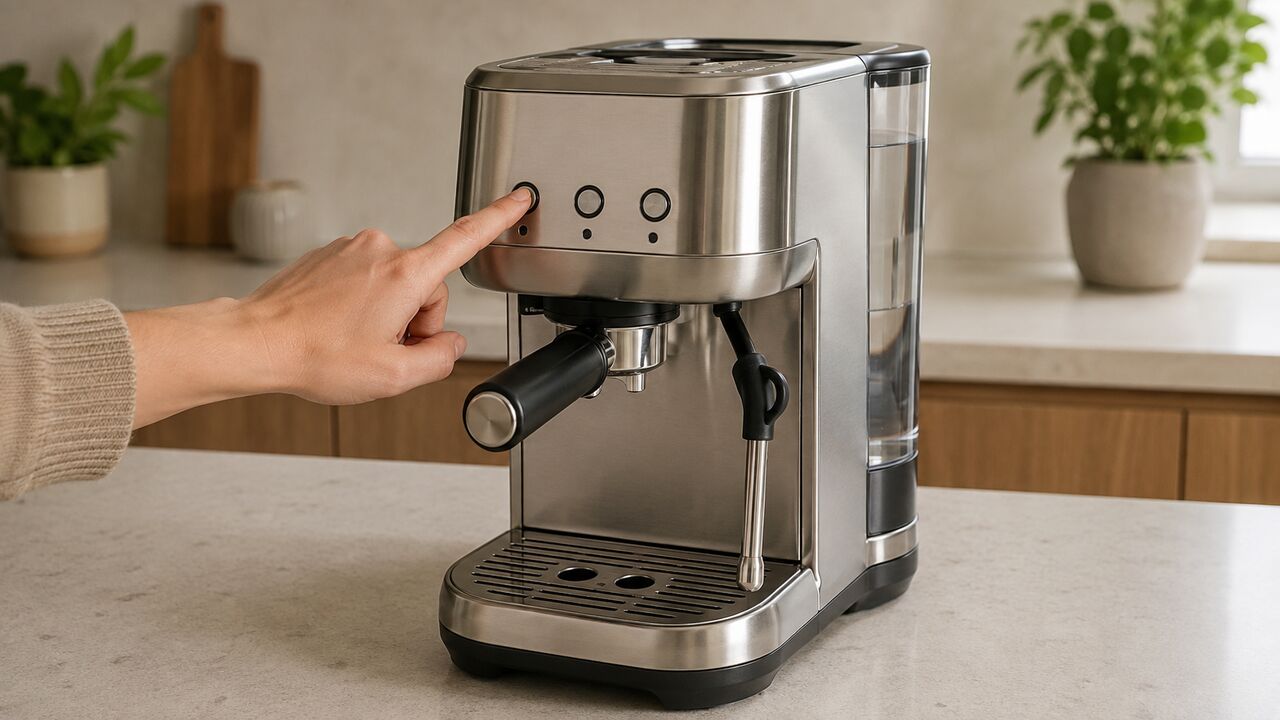
If your Breville Bambino Plus won’t turn on, first fill and firmly reseat the water tank, then press 1 CUP, 2 CUP or STEAM. The BES500 has no separate power button, and low water can leave its three main buttons unlit. If the entire panel remains dark on a confirmed working outlet, inspect only the external cord and plug, then stop: an internal power, control or safety-component fault requires Breville or a qualified technician.
If the machine became unresponsive while it was running, unplug it and allow it to cool for 30–60 minutes before one retest. That is a different branch from a machine that was already cold and completely dead.
Stop immediately if the outlet or GFCI trips again, the cord or plug is damaged or unusually hot, you smell burning, hear crackling, or water may have reached the housing, cord or outlet. Unplug the machine if it is safe to do so. Do not open the case or bypass a fuse, thermal cutout or ground connection.
First identify whether this is really a no-power problem
A dark-looking Bambino Plus is not always electrically dead. Note exactly which controls respond before changing anything.
| What you observe | What it means | Next route |
|---|---|---|
| Every light stays off and no button produces any response | Possible true no-power condition | Tank, wake-up, outlet, cord and cooldown checks below |
| 1 CUP, 2 CUP and STEAM are off with an empty or poorly seated tank | Documented low-water behavior can resemble no power | Fill and reseat the tank first |
| Any control is illuminated or flashing | The machine is receiving enough power to display a state | Use the Bambino Plus light-pattern guide |
| Buttons illuminate but no water comes out | This is a delivery problem, not total power loss | Follow the Bambino Plus water-flow checks |
| Buttons illuminate and water flows but remains cold | The machine has power; heating is the failed function | Do not repeat outlet tests or call it a dead machine |
| The machine stops only after operating for a while | The documented safety thermal cutout may have activated | Switch off, unplug and cool for 30–60 minutes |
| A breaker or GFCI trips, or water is beneath the machine | Potential electrical or leakage hazard | Stop using it; do not keep resetting the circuit |
Confirm the exact model and electrical rating
This guide is for the Bambino Plus BES500 series, including the U.S. BES500BSS. Check the label on the base while the machine is unplugged. The current U.S./Canada BES500 instruction manual rates that version at 120 V, 60 Hz and 1560 W.
Do not substitute a button sequence from the original Bambino BES450, a Barista Express or a machine with a dedicated power switch. Do not connect a North American 120 V machine to an incompatible supply because the plug can be made to fit with an adapter. The rating label, outlet supply and regional model must agree.
The Plus is easy to recognize by its 1 CUP, 2 CUP and STEAM buttons plus separate MILK TEMP and MILK FOAM controls. Its absence of a separate power button is intentional.
Breville Bambino Plus won’t turn on: safe checks in order
1. Make the area dry and look for stop-use signs
Before reconnecting anything, make sure the counter, machine base, cord, plug and outlet are dry. If water is coming from beneath the housing rather than entering the drip tray normally, do not continue with power tests. Use the Bambino Plus leaking-water guide only if it is safe to inspect the external leak location.
Stop without another test if there is a burnt smell, melted or discolored plastic, a cut or crushed cord, a loose plug pin, crackling, smoke, recent liquid entry or evidence that the appliance was dropped. Breville’s manual directs owners to stop using a machine with cord or plug damage or after a malfunction.
2. Fill and firmly reseat the water tank
Lift out the tank, add potable water above MIN and refit it so it sits flush against the back of the machine. Do not merely look through the tank and assume it is attached: press it down into its normal seated position without forcing it.
This check matters because the BES500 deliberately extinguishes the 1 CUP, 2 CUP and STEAM buttons when it detects low water. The manual says those buttons illuminate when the tank is correctly attached and sufficient water is detected. A dry or poorly seated tank can therefore be mistaken for loss of power.
3. Use the correct wake-up action
With the tank fitted and the machine connected to power, press 1 CUP, 2 CUP or STEAM once. Any of those three buttons should turn on the Bambino Plus. Do not search for a rear rocker switch or hold an undocumented combination to “force” power.
If the machine is new and the controls illuminate, it may still need its first-use rinse and heating-system prime. That is not a no-power fault. Follow the first-use sequence for the exact BES500 rather than repeatedly disconnecting it.
4. Perform one normal power-cycle check
If the tank is full but nothing responds, unplug the machine by holding the plug rather than pulling the cord. Leave it disconnected briefly, then reconnect it once and press one main button. A simple reconnect can distinguish a temporary control-panel state from a persistent failure; it is not an internal repair or a guaranteed reset.
Do not keep plugging and unplugging a machine that trips the circuit, smells hot or shows visible damage.
5. Confirm that the outlet actually supplies power
- Unplug the Bambino Plus.
- Test the outlet with a known-working small appliance or outlet tester that you normally use safely.
- If the outlet is dead, inspect the relevant breaker or GFCI only from its normal user control. Reset it once only when the area is dry and there is no damage or burning sign.
- If it trips again when the espresso machine is connected, stop. Leave the machine unplugged and have the appliance and circuit assessed rather than repeating the reset.
- If available, test the machine once in a different known-working, correctly rated grounded outlet without a questionable power strip.
Breville’s own espresso-machine troubleshooting guidance recommends checking the plug, testing another outlet or another device, checking the circuit breaker, inspecting the cord and confirming tank seating before escalating a no-power fault.
6. Check the external cord and plug only
With the plug disconnected, visually follow the accessible cord from the outlet to the point where it enters the machine. Look for cuts, flattening, sharp bends, melted insulation, discoloration or a plug that no longer fits firmly. Do not remove a panel to trace the cord farther.
The BES500 draws up to 1560 W. If an extension cord is unavoidable, the manual requires its marked electrical rating to be at least as great as the appliance rating and requires a three-prong grounding plug. A light-duty extension lead, travel adapter or damaged power strip is not a diagnostic fix. A direct known-good outlet is the cleaner test.
If it stopped during brewing or steaming
A machine that worked and then ceased operating has an extra documented branch. The BES500 troubleshooting table says its safety thermal cutout may activate if the pump overheats.
- Stop pressing the controls.
- Switch the machine off with 1 CUP and STEAM together if the controls still respond.
- Unplug it from the outlet.
- Allow it to cool undisturbed for 30–60 minutes.
- After confirming the tank is full and the area is dry, perform one restart test.
If it restarts but stops again during normal use, discontinue use and contact support. Repeated thermal-cutout behavior is not solved by repeatedly cooling and restarting. If only the steam function fails while the panel and brewing side still work, use the Bambino Plus steam-wand diagnosis instead.
A factory reset cannot power up a dead panel
The documented BES500 factory reset restores saved espresso shot volumes. It requires the machine’s buttons and indicator lights to respond. It does not reset a breaker, repair a cord, restore an open electrical safety component or clear a true no-power fault.
If the machine turns on but the single- or double-shot amount is wrong, the reset belongs to normal control setup; follow the Bambino Plus settings and shot-volume guide. Do not apply reset combinations copied from a different Breville model to a completely dark BES500.
Do not open the housing or replace an internal fuse
Once the full tank, correct wake action, known-good outlet, external cord inspection and applicable cooldown test have failed, outside observations cannot identify the internal cause. Possibilities may involve power entry, wiring, a control board, a switch input or a safety component, but naming one from a dark panel would be guesswork.
- Do not remove the stainless-steel housing.
- Do not bridge or bypass a fuse, thermostat, thermal cutout or ground conductor.
- Do not probe an energized appliance with a multimeter.
- Do not install a generic internal component merely because its voltage or dimensions look similar.
- Do not continue using an outlet that became hot, loose or intermittent during the test.
Breville’s general guidance treats internal wiring or fuse work as a manufacturer or technician task. Its current North American warranty terms also exclude certain damage caused by unauthorized alteration, modification or repair, so check coverage before anyone opens the machine.
What to tell Breville support
Use the official BES500 product and support hub for the current manual, registration, parts and support route. Prepare the following before contacting them:
- Exact model and suffix from the rating label.
- Serial number and batch code.
- Purchase date and receipt.
- Whether every light is dark or only the three main buttons are dark.
- Whether filling and reseating the tank changed the panel.
- Results from a known-working outlet.
- Whether the machine stopped during use and whether it restarted after cooling.
- Any trip, smell, unusual heat, sound, leak or prior damage.
Breville’s current North American warranty process asks for the model, batch or serial details and proof of purchase before repair or replacement instructions are issued. Coverage depends on the current terms, purchase and region; registration does not replace the receipt.
If your panel is not completely dark, return to the Bambino Plus troubleshooting hub and choose the observed function or light pattern. That prevents a water, steam, heating or maintenance symptom from being misdiagnosed as electrical power loss.
Breville Bambino Plus power FAQs
Where is the power button on the Bambino Plus?
The BES500 has no separate power button. With the machine plugged in and the tank filled and seated, press 1 CUP, 2 CUP or STEAM to turn it on. Pressing 1 CUP and STEAM together turns it off.
Why are the 1 CUP, 2 CUP and STEAM lights all off?
The BES500 intentionally leaves those three buttons unlit when it detects low water. Fill the tank and refit it flush against the machine. If every control remains dark and no button responds after that, continue with the outlet and cord checks.
Will a factory reset fix a Bambino Plus with no power?
No. The documented factory reset restores programmed espresso volumes and requires responsive buttons and lights. It cannot restore electrical power to a dead panel.
Why did my Bambino Plus suddenly shut off?
If it stopped while operating, the manual identifies a possible pump-overheat safety cutout. Switch off, unplug and cool it for 30–60 minutes before one retest. If it stops again, discontinue use and contact Breville.
Should I replace the fuse myself?
No internal fuse is listed as routine owner maintenance. A completely dark panel does not identify which internal component failed, and opening a 120 V appliance adds shock, fire and warranty risks. Use Breville or a qualified technician.
Can descaling fix a Bambino Plus that will not turn on?
Not when the panel is genuinely dead. Descaling can address mineral buildup when the powered machine has reduced flow, heat or performance, but a dark unresponsive panel cannot enter the documented descale cycle. Diagnose the power supply first.
What if the Bambino Plus works in another outlet?
That points back to the original outlet, GFCI, breaker, power strip or circuit rather than proving the espresso machine is defective. Do not continue using an intermittent, loose, hot or repeatedly tripping outlet; have the electrical supply checked.
The decisive boundary is simple: a full, correctly seated tank plus the correct wake action and a confirmed working outlet should produce some response. If the BES500 remains entirely dark after those external checks—or if any electrical warning sign appears—leave it unplugged and move to professional support.