
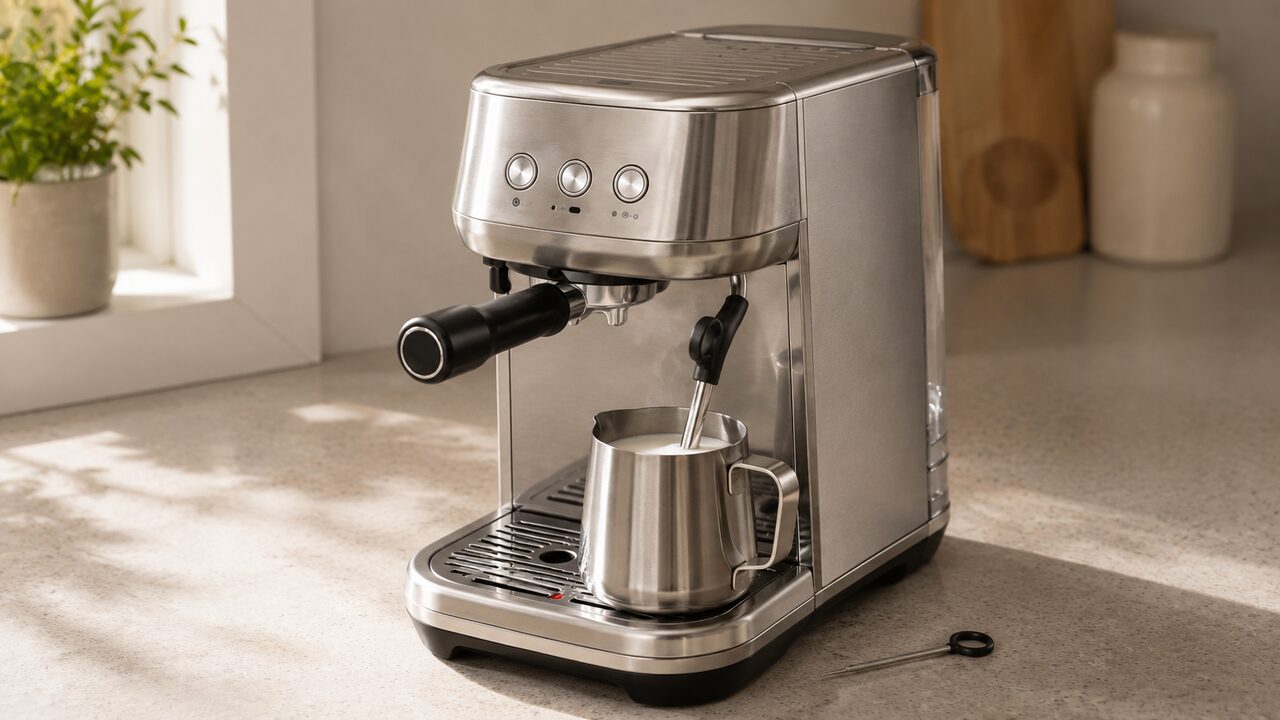
Breville Bambino Plus steam wand not working? First fill and firmly reseat the water tank, let the machine reach ready mode, lower the wand over the drip tray and hold STEAM for 5 seconds to run a manual purge. If steam is still weak or absent, let the wand cool and clean every hole in the tip with the supplied cleaning tool. When manual steam works but automatic milk texturing does not, the more useful checks are the jug position, milk level and temperature-sensor contact—not the pump.
This guide is specifically for the Breville Bambino Plus BES500 series, including the BES500BSS sold in the United States. It does not apply to the original Bambino BES450 or to a Barista Express. If the group head and hot-water function have also stopped, use the broader Breville Bambino Plus troubleshooting guide to diagnose the shared water path.
Burn warning: Pressurized steam can be released even after the machine has been switched off. Keep hands away from the tip during testing. Before removing the steam tip, switch the machine off, unplug it and allow the wand to cool completely. Do not open the machine housing.
Quick diagnosis: match the exact symptom
| What happens | Most likely branch | First action |
|---|---|---|
| The STEAM button flashes while milk is being textured | Normal automatic operation | Wait for the selected temperature or press STEAM to stop |
| MILK TEMP and MILK FOAM lights move in a downward pattern | The wand has been left raised | Lower the wand fully |
| Steaming stops, STEAM goes dark, and all MILK TEMP and MILK FOAM lights flash | The machine detected a blocked wand | Cool and clean the tip, then complete a manual purge |
| MILK TEMP and MILK FOAM flash together with a steam-function error | The tank may be empty or the steam system needs purging | Fill and reseat the tank, then hold STEAM for 3 seconds |
| Manual steam works but automatic texturing does not | Jug position, sensor contact, fill level or auto-mode setup | Repeat the automatic setup with the supplied jug |
| Hot water comes through the wand but steam does not | A steam-specific problem is more likely than a fully blocked outlet | Purge, clean the tip and check whether descaling is due |
| Neither hot water nor steam comes through the wand | Tank, water supply, scale or an internal water-path fault | Stop repeated tests after the owner-safe checks |
Run this five-minute steam test in order
- Fill and reseat the tank. Keep the water above MIN and push the tank down completely. The 1 CUP, 2 CUP and STEAM buttons should illuminate when the machine has sufficient water and is ready.
- Run a manual purge. Empty and refit the drip tray, lower the wand, keep clear of the tip and hold STEAM for 5 seconds. A normal pumping sound during the purge is expected.
- Test hot water through the same wand. In ready mode, raise the wand over the drip tray and press 1 CUP and MILK FOAM together. Press 1 CUP to stop the hot water.
- Test automatic texturing correctly. Use fresh cold milk in the supplied stainless-steel jug, filled between MIN and MAX. Put the jug flat on the temperature sensor, make sure the milk covers the tip and lower the wand completely before pressing STEAM.
- Compare automatic and manual steam. If the automatic test fails but the wand produces strong steam when raised and operated manually, concentrate on the automatic setup and sensor branch below. If both modes are weak, concentrate on flow, the tip and scale.
Do not repeat dry or no-flow tests for minutes at a time. Once the pattern is clear, move to the matching section rather than continually restarting the pump.
If the Bambino Plus wand needs to be lowered
The BES500 uses the wand position to distinguish automatic milk texturing from manual operation. For automatic texturing, the wand must be fully lowered into the jug while the jug rests on the milk-temperature sensor. If the wand remains raised after use, the MILK TEMP and MILK FOAM lights illuminate in a downward sequence to ask you to lower it.
Lowering the wand after milk texturing also starts the automatic purge. That short release of water and steam into the drip tray is intentional: it helps clear milk residue and returns the heating system toward brewing temperature. Wipe the wand first, then lower it and let the purge finish.
For manual milk texturing, the wand is raised and the automatic temperature stop is disabled. You must press STEAM to stop it yourself. A machine that steams normally in this raised, manual mode but will not run correctly in the lowered automatic position has already shown that it can generate steam; check the jug and sensor setup before assuming the heater has failed.
How to clear a blocked or weak steam wand
Dried milk can narrow one or more holes in the steam tip. The first signs may be slow heating, poor circulation in the jug, uneven jets or foam that suddenly becomes coarser. A severe blockage can make the Bambino Plus stop texturing and display its blocked-wand alert.
- Wipe the outside of the wand with a clean damp cloth while residue is still fresh, taking care around the hot metal.
- After the wand is clear of milk and positioned over the tray, lower it and hold STEAM for 5 seconds to attempt a manual purge.
- If performance is still poor, switch the machine off, unplug it and wait until the wand and tip are completely cool.
- Remove the water tank and take out the supplied steam-tip cleaning tool stored beneath it.
- Use the tool to unscrew the steam tip. Clear each tip hole with the pin on that same tool; do not enlarge the holes or dismantle the wand.
- Rinse the removed tip, wipe it with a clean dry cloth, screw it back onto the wand and refit the water tank.
- Fill and firmly seat the tank, switch the machine on and complete another 5-second manual purge before testing milk.
Breville provides the same owner-level sequence in its Bambino Plus steam-wand cleaning tutorial. If the tip will not unscrew with reasonable force, or it is damaged or cross-threaded, stop rather than forcing it.
Automatic milk frothing does not start
Automatic texturing depends on more than steam output. The machine must detect the correct wand position and use the temperature sensor beneath the jug. Set up one controlled test before changing parts:
- Use the supplied stainless-steel milk jug. Breville specifies this jug for the automatic function.
- Start with fresh cold milk and keep the level between the jug’s MIN and MAX marks.
- Make sure the milk covers the steam tip when the wand is lowered.
- Place the jug base flat on the temperature sensor rather than partly on the surrounding drip-tray grid.
- Wipe away milk or water that prevents stable jug contact, then select one MILK TEMP and one MILK FOAM setting.
- Lower the wand fully and press STEAM once. The STEAM button should flash during normal automatic texturing.
If manual steam is strong but this exact automatic setup repeatedly fails, do not keep cleaning an already open tip. The evidence points more strongly toward wand-position detection, jug-to-sensor contact or the automatic control system. Those parts are not an owner-serviceable reason to open the base or pry at the sensor.
Milk stops early, stays cool or gets too hot
| Milk result | Check before blaming the heater | What the result suggests |
|---|---|---|
| Automatic cycle stops almost immediately | Jug is flat on the sensor, wand fully lowered and milk above the tip | Incorrect setup or an automatic detection fault |
| Milk remains cool and there is little or no jet from the tip | Tank, manual purge, tip holes and hot-water test | Insufficient steam or water flow |
| Milk heats but barely foams | MILK FOAM setting, cold starting temperature, milk type and tip coverage | Texturing setup or milk behavior rather than no steam |
| Milk becomes too hot in automatic mode | Correct MILK TEMP selection and full jug contact with the sensor | The manual specifically associates overheating with incorrect jug position |
| Milk overheats in manual mode | Stop STEAM yourself at the desired temperature | Automatic temperature shutoff is disabled in manual mode |
Dairy and plant-based milks can produce different foam volumes even when the machine is operating normally. Compare performance with the same milk, starting temperature, quantity, jug and settings. That controlled comparison is more useful than judging the wand from a single unfamiliar milk.
If steam is strong but the milk will not foam
Strong, even steam that heats the milk rules out a complete steam failure. In automatic mode, raise the MILK FOAM setting and verify that the tip is covered but the jug is not filled above MAX. Too much milk leaves inadequate room for expansion, while too little can place the tip incorrectly relative to the surface.
In manual mode, Breville places the tip about 3/4 inch (1–2 cm) below the surface near the jug’s 3 o’clock position. Establish a rotating vortex, then bring the tip close enough to the surface to introduce air without producing large splashing bubbles. Manual technique and automatic settings are different diagnostic branches; do not use poor manual technique as proof that the automatic system is defective.
What the steam-related flashing lights mean
The timing and movement of the lights matter. “The milk lights are flashing” is not enough to identify one fault on the Bambino Plus.
| Documented pattern | Meaning | Correct response |
|---|---|---|
| STEAM flashes during automatic milk texturing | The selected cycle is running | No fault action is required |
| MILK TEMP and MILK FOAM illuminate in a downward pattern | The wand needs to be lowered | Lower it and allow the automatic purge |
| STEAM turns off; all MILK TEMP and MILK FOAM lights fully illuminate and flash after texturing stops | The machine detected a blocked wand | Clean the cooled tip and complete a manual purge |
| Froth and temperature lights flash together with a steam-function error | The water tank may be empty and the system needs purging | Fill and reseat the tank, then hold STEAM for 3 seconds |
The blocked-wand description appears twice in the current manual: the operating section tells the owner to complete the steam-tip cleaning process, while the care section says the warning remains until a manual purge is completed. The safe combined response is to clear the cooled tip when needed, refit it and then perform the manual purge. Do not invent a factory-reset sequence for this warning.
Use the hot-water test to separate the fault
The Bambino Plus sends both steam and hot water through the wand, so the hot-water function is a useful separator. With the machine ready and the wand raised over the drip tray, press 1 CUP and MILK FOAM together. Press 1 CUP to stop.
- Hot water flows normally: the tank can feed the machine and the wand outlet is not completely sealed. Continue with purging, tip cleaning and the steam-specific checks.
- Hot water is also weak: firmly reseat the tank and consider whether the documented descale cycle is due. A partial tip blockage can still restrict both outputs.
- No hot water and no steam: the problem is broader than automatic frothing. After checking the tank and tip once, stop repeated pump operation and arrange support if flow does not return.
This test narrows the diagnosis; it does not prove which internal valve, heater or control has failed. Those components require electrical and pressure-system access and are outside routine owner maintenance.
Can descaling restore weak steam?
Descaling can help when steam weakened gradually and other water functions also show reduced flow, especially if the machine is displaying its descale alert. It will not remove dried milk sealing the external steam-tip holes, and a group-head cleaning tablet cycle is not a substitute for descaling.
Clean and purge the tip first because that is the direct steam-wand check. If performance remains weak and descaling is due, use the dedicated BES500 sequence and the specified descaling product in the current U.S. Bambino Plus instruction manual. Do not copy a button combination or homemade solution from a different Breville model.
Will a factory reset fix the steam wand?
No documented Bambino Plus factory reset repairs the steam system. The reset described in the BES500 manual restores the programmed espresso volumes; it does not reset the heater, temperature sensor, wand-position detection or a physical blockage.
Holding STEAM for 5 seconds with the wand lowered is a manual purge, not a factory reset. The separate 3-second instruction belongs to the troubleshooting response for flashing milk-temperature and foam lights associated with a steam-function error or an empty tank.
When to stop troubleshooting and contact Breville
- There is no hot water or steam after the tank has been filled and seated, the cooled tip has been cleaned and one purge has been attempted.
- The blockage warning immediately returns even though every tip hole is open and the purge completes.
- Manual steam is reliable, but automatic texturing repeatedly fails with the supplied jug correctly positioned.
- The machine stops operating, controls become unresponsive or it repeatedly needs a long cool-down. Breville’s manual says a safety thermal cutout may require switching off, unplugging and cooling for 30–60 minutes; recurrence needs support.
- Water or steam escapes from the housing, a breaker or GFCI trips, the cord is damaged, or there is a burning smell or unusual heat.
Record the model and serial number plus a short video showing the controls, wand position and exact light pattern. That is more useful to Breville or an authorized repairer than describing every pattern simply as “flashing lights.” Do not remove the case to inspect a 120V steam appliance.
If Breville confirms that repair is unavailable or not economical, match the exact BES500 model and voltage before replacing the machine.
Breville Bambino Plus steam wand FAQs
Why is the STEAM button flashing?
The STEAM button normally flashes while the Bambino Plus is automatically texturing milk. It is more important to diagnose what happens next: an automatic stop at the selected temperature is normal, while STEAM going dark as all milk-temperature and foam lights flash indicates a detected blockage.
Why are all the milk temperature and foam lights flashing?
If texturing stops and STEAM turns off while both rows fully illuminate and flash, clean the cooled steam tip and complete a manual purge. If the lights instead flash together with a steam-function error, the manual says the tank may be empty: fill it and hold STEAM for 3 seconds to purge the system. A downward moving pattern simply asks you to lower the wand.
Why does the pump run but no steam comes out?
A pumping sound during steaming is normal, but sound without output is not. Check the tank level and seating, run the hot-water test, then cool and clean the tip. If neither hot water nor steam returns, stop prolonged pump tests and arrange professional diagnosis.
Why does manual steam work but automatic frothing does not?
That result shows that the machine can produce steam. Repeat the automatic setup with the supplied jug flat on the temperature sensor, cold milk between MIN and MAX, milk covering the tip and the wand fully lowered. Persistent failure after that points more strongly to position or temperature detection than to a blocked pump.
Can I use a different milk pitcher for automatic frothing?
Breville instructs owners to use the supplied stainless-steel milk jug for this machine’s automatic frothing function. A different jug can alter contact with the temperature sensor and the relationship between its fill level and the steam tip.
Why does water enter the drip tray after steaming?
The Bambino Plus automatically purges after you lower the wand. Water and a short pumping sound entering a correctly installed drip tray are expected. Water repeatedly appearing under the machine or escaping from the housing is a different symptom and should not be dismissed as normal purging.
Does descaling clean a blocked steam tip?
No. Descaling treats mineral buildup inside the water system; the supplied steam-tip tool clears dried milk or residue from the external holes. Weak steam can involve either problem, so clean and purge the tip first, then descale only when the machine is due or the wider flow pattern supports it.
How do I prevent another steam-wand blockage?
After every milk session, wipe the wand with a clean damp cloth, lower it promptly and let the automatic purge finish. Do not leave the wand raised with milk drying on the tip, and empty the drip tray as needed so the purge can complete normally.
The decisive test is whether the BES500 can deliver hot water and manual steam through the wand. Strong manual steam redirects the diagnosis toward the automatic jug-and-sensor setup; weak steam redirects it toward the tank, purge, tip or scale; and failure of both hot water and steam after those checks marks the end of safe owner troubleshooting.