
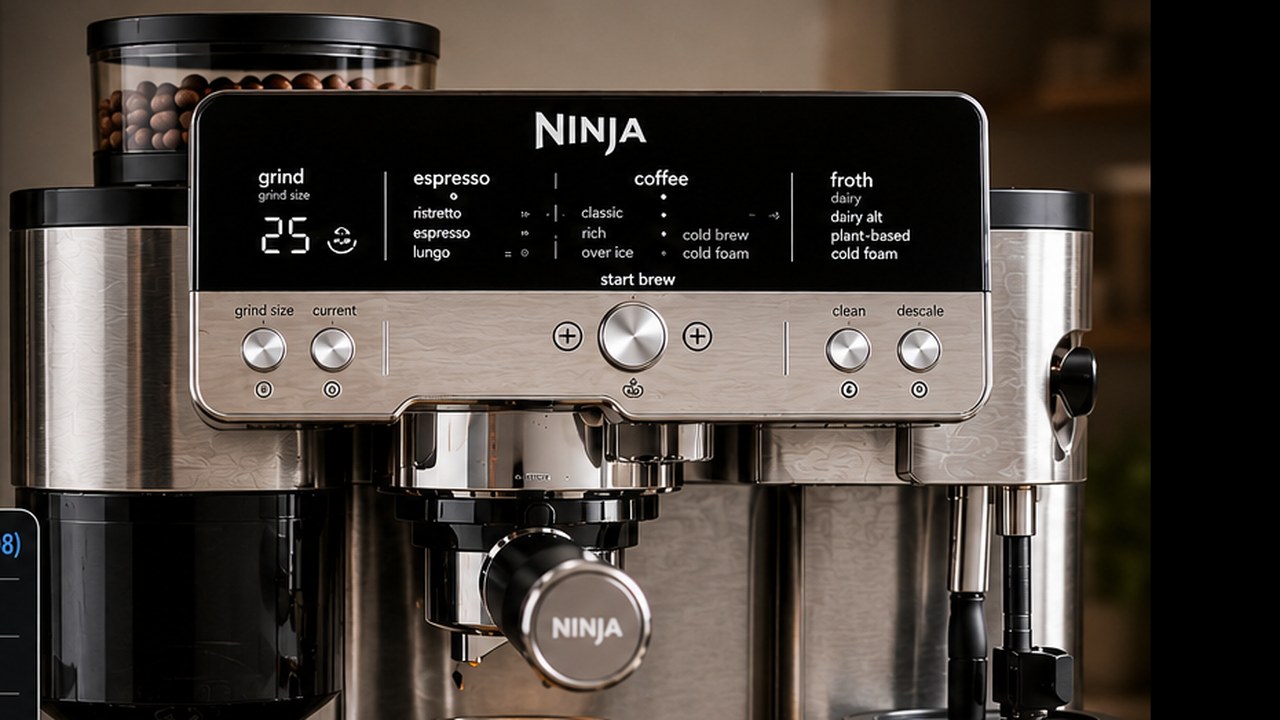
The Ninja Luxe Café Premier ES601 has more adjustable settings than its main control panel initially suggests. You can change brew temperature, espresso strength, coffee strength, milk temperature, water hardness, Eco Mode, grind recommendations, Barista Assist calibration and several other preferences.
The most searched setting is temperature, but temperature is only one part of getting the ES601 dialed in correctly. A high brew temperature is not automatically better, and changing strength does not work the same way for espresso and drip coffee. This guide explains what each Ninja Luxe Café setting actually changes and when it is worth adjusting.
Ninja Luxe Café ES601 settings at a glance
| Setting | Options | Good starting point |
|---|---|---|
| Brew temperature | Low / Medium / High | Medium |
| Espresso strength | Less concentrated / Default / More concentrated | Default |
| Coffee strength | Mild / Default / Bold | Default |
| Froth temperature | Low / Medium / High | Medium |
| Milk type | Dairy / Plant-Based | Match the milk used |
| Recommended grind display | On / Off | On |
| Eco Mode | On / Off | Personal preference |
| Water hardness | hd 0–hd 5 | Match test strip |
How to open the Ninja Luxe Café additional settings menu
The ES601 has an Additional Settings menu identified by codes such as _h01, _h06 and _h08.
- Turn the Ninja Luxe Café on.
- Press and hold the SIZE button for about 3 seconds.
- Turn the center dial to move through the available h settings.
- Press the center dial or START BREW, depending on the control-panel revision, to enter the selected setting.
- Turn the dial to select the desired option.
- Confirm the selection.
- Press SIZE again to leave the Additional Settings menu.
The exact labels on the front panel can vary slightly between ES601 revisions and regional versions, so this guide is focused on the U.S. Ninja Luxe Café Premier ES601 and the ES600/ES601 settings documented for that machine family.
Ninja Luxe Café h01–h08 settings explained
| Code | Setting | What it changes |
|---|---|---|
| _h01 | Beeps | Turns machine sounds on or off |
| _h02 | Eco Mode | Reduces energy use after brewing |
| _h03 | Recommended Grind Size | Shows or hides Barista Assist grind recommendations |
| _h04 | Barista Assist Reset | Resets learned grind recommendations |
| _h05 | Factory Reset | Returns machine variables to their defaults |
| _h06 | Brew Temperature | Changes drink/extraction temperature |
| _h07 | Froth Temperature | Changes hot milk/froth temperature |
| _h08 | Hard Water | Sets water hardness from hd 0 to hd 5 |
Best Ninja Luxe Café temperature setting
For most owners, Medium is the best starting brew-temperature setting. Do not move straight to High simply because you want hotter coffee. Brew temperature affects extraction and flavor as well as the temperature you feel in the cup.
| Coffee | Suggested temperature | Why |
|---|---|---|
| Dark roast | Low or Medium | Helps avoid extracting excessive bitterness from heavily roasted beans |
| Medium roast | Medium | Balanced starting point |
| Light roast | Medium or High | Extra heat can help extract harder, denser light-roasted coffee |
Ninja itself recommends a lower or medium temperature for darker roasts and medium or high for lighter roasts. That makes more sense than choosing temperature based only on how hot you want the final drink.
How to change brew temperature on the ES601
- Press and hold SIZE for about 3 seconds.
- Turn the center dial to _h06.
- Select the setting.
- Choose LO, M or HI.
- Confirm the setting and exit the menu.
Medium is the default and should be your baseline unless taste or roast style gives you a reason to change it.
What Low, Medium and High actually change
Low temperature
Low is most useful with darker beans that already extract easily. If a dark espresso tastes aggressively bitter, burnt or harsh despite a sensible grind, lowering brew temperature can help.
Medium temperature
Medium is the safest general-purpose setting. Use it while dialing in new beans before changing temperature to solve a problem that might actually come from grind size or extraction.
High temperature
High can be useful for light roasts that taste sour, thin or under-extracted after the grind is reasonably dialed in. It can also increase drink temperature, but extraction should remain the main reason to select it.
Coffee still not hot enough on High?
The machine setting is only part of the final temperature in your cup. Espresso contains a relatively small volume of liquid, so a cold portafilter and heavy cold mug can remove heat quickly.
- Warm the cup before brewing.
- Preheat the portafilter with a water-only flush.
- Dry the basket before adding coffee.
- Use a cup reasonably close to the size of the drink.
- Check whether maintenance or descaling is overdue if temperature has gradually declined.
If the ES601 has broader temperature or water-flow problems even after those checks, use our Ninja Luxe Café troubleshooting guide.
Ninja Luxe Café froth temperature settings
Brew temperature and milk temperature are separate settings. Changing the espresso temperature does not automatically increase the frothing temperature.
For milk, use _h07 Froth Temperature:
- LO: cooler milk and potentially slightly thinner froth.
- M: Ninja’s normal default and the best starting point.
- HI: hotter milk and useful when normal hot froth is consistently cooler than desired.
Remember that Cold Foam is supposed to remain cold. Selecting HI does not turn Cold Foam into a heated froth program.
If the milk remains cold, frothing repeatedly stops or the machine produces little or no foam, that has moved beyond a simple settings question. Use our Ninja Luxe Café frother troubleshooting guide.
Select the correct milk type too
Temperature is not the only frothing setting that matters. The ES601 also lets you identify whether you are using DAIRY or PLANT-BASED milk.
Use the option that matches the milk in the jug before running the automated frothing program. Different milks behave differently when heated and aerated, so the correct milk-type selection helps the DualFroth system produce a more appropriate result.
Ninja Luxe Café espresso strength settings
Espresso strength is easy to misunderstand because it does not simply tell the grinder to add more coffee. On the ES601, changing espresso strength changes the relationship between the amount of coffee and the amount of brewed espresso.
| Setting | Result |
|---|---|
| Less concentrated | More water relative to the coffee; larger output |
| Default | Balanced standard espresso ratio |
| More concentrated | Less water relative to the coffee; smaller, stronger output |
This means a stronger espresso setting can make the finished shot smaller, not larger. That behavior can look like a brewing-volume problem if you forget that the strength setting was changed.
Coffee strength works differently from espresso strength
For drip coffee, strength changes how much coffee is dosed rather than simply applying the espresso ratio logic.
- Mild: less coffee is dosed.
- Default: normal dosing.
- Bold: more coffee is dosed.
If drip coffee tastes weak, Bold may be useful. If it tastes overly intense, Mild can be more appropriate. Do not assume the same strength adjustment behaves identically for espresso.
Should you change the recommended grind setting?
Barista Assist recommends a grind size as a starting point, but it does not physically prevent you from changing the grinder. The ES601 has 25 grind settings.
For a new bag of beans, begin with the recommendation and judge the extraction before making large changes.
- If espresso runs too quickly and tastes sour or weak, move finer in small steps.
- If espresso runs extremely slowly and tastes harsh or bitter, move coarser in small steps.
If the grinder itself jams, stops, shows ADD BEANS with a full hopper or no longer responds correctly to grind changes, see our Ninja Luxe Café grinder troubleshooting guide.
What _h03 Recommended Grind Size does
Setting _h03 controls whether the machine displays its recommended grind setting.
For most owners, leave this ON. Turning the recommendation off does not improve espresso or disable the grinder; it simply removes guidance that is useful when changing beans or drink styles.
What _h04 Barista Assist Reset does
Barista Assist can adapt its grind recommendation as you brew. If those recommendations have moved in an unhelpful direction or you want to start fresh with new beans, _h04 resets the recommended grind behavior to its default starting point.
This is a narrower reset than restoring the entire machine to factory settings.
Barista Assist reset vs. factory reset
| Reset | Use it when |
|---|---|
| _h04 Barista Assist Reset | You only want to reset learned/recommended grind behavior |
| _h05 Factory Settings Reset | You want to return the machine’s adjustable variables to their defaults |
Use the least destructive reset that matches the problem. There is no reason to factory-reset the whole ES601 simply because you want Barista Assist to reconsider its grind recommendation.
How to factory reset the Ninja Luxe Café ES601
- Open the Additional Settings menu by holding SIZE for about 3 seconds.
- Turn the center dial to _h05 Factory Settings Reset.
- Select the setting.
- Choose YES only if you genuinely want to restore the adjustable settings.
- Confirm the choice.
Do not use unofficial button combinations from unrelated Ninja coffee makers when the ES601 already provides a documented factory-reset option in its settings menu.
What _h02 Eco Mode changes
Eco Mode reduces unnecessary energy use by changing what the heating system does after brewing.
Turning Eco Mode on can make sense if energy saving matters more than keeping the machine immediately ready for another hot drink. Leaving it off is reasonable if you frequently prepare several drinks close together.
Eco Mode does not change grind size, espresso strength or coffee flavor directly.
What _h01 Beeps changes
Setting _h01 simply turns the machine’s audible beeps on or off.
Turning beeps off can make the machine quieter, but remember that some maintenance and completion cues are easier to notice when sound is enabled.
Set water hardness correctly with _h08
The ES601 uses its water-hardness setting as part of maintenance management. This is not a flavor or strength control.
Use the supplied hardness test strip with the water you normally put in the machine, then match the number of purple boxes to the appropriate hd 0–hd 5 setting.
Do not simply leave hd 5 selected because it is the highest number. The correct setting is the one that matches your tested water.
Water hardness is particularly relevant to the machine’s scale-management schedule. When the DESCALE reminder appears, follow our Ninja Luxe Café descale instructions.
Best Ninja Luxe Café settings for dark roast
| Brew temperature | Low or Medium |
| Strength | Default initially |
| Grind | Start with Barista Assist recommendation |
| Froth temperature | Medium unless personal preference differs |
Dark beans extract relatively easily. If the espresso tastes burnt or aggressively bitter, test a slightly coarser grind or lower temperature rather than automatically increasing strength.
Best Ninja Luxe Café settings for medium roast
| Brew temperature | Medium |
| Strength | Default |
| Grind | Barista Assist recommendation |
| Froth temperature | Medium |
Medium roast is the easiest place to begin because the ES601 defaults are already designed as balanced starting settings. Change one variable at a time only after tasting the result.
Best Ninja Luxe Café settings for light roast
| Brew temperature | Medium or High |
| Strength | Default initially |
| Grind | Start recommended, then consider slightly finer if under-extracted |
| Froth temperature | Personal preference |
Light roasts can be harder to extract. If the coffee remains sharply sour after a sensible grind adjustment, High brew temperature can be useful.
Best settings for milk drinks
For latte, cappuccino and other milk drinks, separate the coffee settings from the milk settings.
- Dial in the espresso first.
- Select DAIRY or PLANT-BASED correctly.
- Use Medium froth temperature as the baseline.
- Choose the froth style based on the texture you want.
- Only increase froth temperature if the hot-milk result is consistently cooler than desired.
Can you change temperature for Over Ice and cold drinks?
Do not expect every cold drink mode to offer the same temperature control as a normal hot espresso. Cold-oriented brew programs are designed around their own brewing parameters.
If a temperature option disappears or cannot be adjusted while using Over Ice, Cold Brew or another cold program, that does not automatically indicate a control-panel fault.
Should you use “best settings” from another owner?
Use other owners’ settings as ideas, not universal presets. Two ES601 machines using different beans, roast dates, water, cup sizes and milk can need different adjustments.
The most transferable starting point is the machine’s own defaults combined with Barista Assist. Then adjust based on what you taste.
Change one setting at a time
If an espresso tastes wrong, changing temperature, grind, strength and beans simultaneously makes it almost impossible to know which change helped.
- Start with fresh beans and the recommended grind.
- Brew at the default strength and Medium temperature.
- Judge flow and taste.
- Correct an obvious grind problem first.
- Then adjust brew temperature if roast level or extraction still suggests it.
- Use strength to change concentration according to preference.
Settings not saving or behaving strangely?
If a setting immediately returns to its previous value, make sure you are confirming the choice rather than simply turning the dial and leaving the menu.
- Select the h setting.
- Choose the desired option.
- Confirm the new value.
- Exit the menu normally.
- Reopen the menu to verify the stored setting if necessary.
If multiple unrelated settings repeatedly reset themselves or controls stop responding, that is no longer simply a question of choosing the right setting. Follow the general ES601 troubleshooting process instead.
Recommended ES601 settings to leave alone unless needed
You do not need to customize every option just because it exists. If the machine is brand new, complete the Ninja Luxe Café first-use setup first. After that, a sensible starting configuration for the ES601 is:
- Beeps: ON
- Eco Mode: personal preference
- Recommended Grind Size: ON
- Brew Temperature: Medium
- Froth Temperature: Medium
- Water Hardness: value from your test strip
- Barista Assist Reset: leave alone unless you need to reset its recommendation
- Factory Reset: use only when you intentionally want to reset the machine’s adjustable settings
The best Ninja Luxe Café settings depend on the coffee
There is no single hidden ES601 configuration that makes every bean taste better. The strongest starting strategy is to leave most settings at their defaults, set water hardness correctly, keep Barista Assist grind recommendations visible and adjust only the variables that relate to the result you are trying to change.
For temperature, start at Medium and use roast level as your guide: lower for dark coffee when necessary and higher for light coffee when extraction needs more heat. For espresso strength, remember that changing concentration also changes output volume. For milk, adjust the separate froth temperature and select the correct dairy or plant-based mode.
Once you treat grind, temperature, strength and milk settings as separate controls rather than moving everything at once, the Ninja Luxe Café becomes much easier to dial in—and much easier to troubleshoot when a drink does not come out the way you expected.