
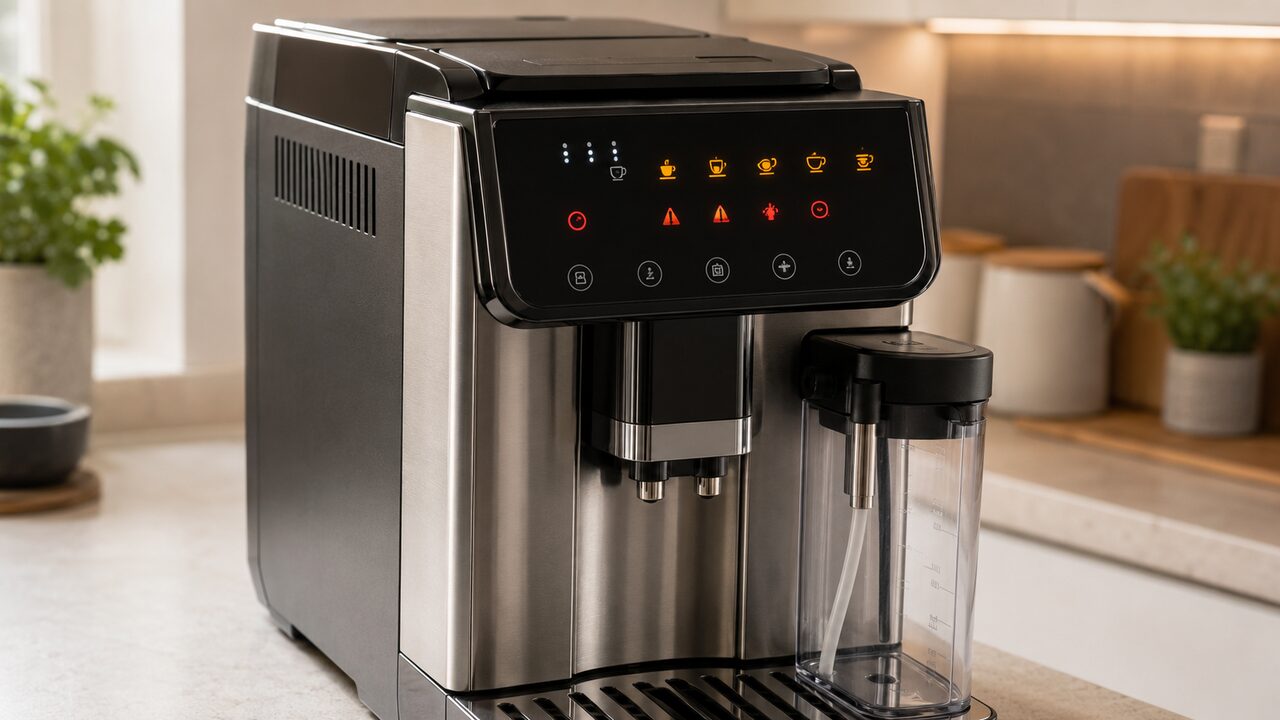
DeLonghi Magnifica Evo warning lights are read by combining the illuminated symbol, whether it is steady or flashing, and what the ECAM29084SB was doing when it appeared. A steady water, filter, grounds or descale indicator normally identifies routine action. A flashing indicator or a red general-alarm triangle paired with another button points to a missing part, interrupted operation or condition that must be corrected before the machine continues.
If you are trying to identify DeLonghi Magnifica Evo error lights or understand what the panel lights mean, match the symbol first and then check whether it is steady, flashing or rapidly flashing. On the ECAM29084SB, the same indicator can require a different response depending on its state and what the machine was doing when it appeared.
This guide is specifically for the U.S. De’Longhi Magnifica Evo with LatteCrema System ECAM29084SB, using the ECAM29X.6Y–29X.8Y control family. Do not copy these meanings to the ECAM29043SB traditional-frother model, Magnifica Evo Next ECAM31080SB or a panel with different drink icons. For symptoms not explained by a light, use the complete Magnifica Evo ECAM29084SB troubleshooting guide.
Stop and unplug the machine if safe if a breaker trips, the cord or plug is damaged or unusually hot, you smell burning, water reaches an electrical area or the machine repeatedly shows a general alarm after the documented owner-safe checks. Do not remove the housing, bypass a sensor or force the infuser, water tank, tray or carafe into place.
If the red general-alarm triangle stays on or returns after the basic checks, follow the full Magnifica Evo general alarm troubleshooting guide.
Magnifica Evo warning lights: quick meanings
| Light or panel state | Usual meaning | First safe response |
|---|---|---|
| Drink icons flashing together | The machine is warming up, rinsing or changing operating state | Wait for the automatic action to finish |
| Drink and option icons steady | The machine is ready | Select a drink or option |
| Water-tank indicator steady | Not enough water | Fill the tank with fresh water |
| Water-tank indicator flashing | Tank missing or not seated correctly | Remove and reinstall the tank squarely |
| Water-filter indicator | Installed filter is exhausted | Replace it or remove it and update the filter setting |
| Grounds-container indicator steady | Grounds container must be emptied | Empty and clean it together with the drip tray |
| Grounds-container indicator flashing | Container or complete tray assembly is missing or mis-seated | Reinstall the tray and grounds container fully |
| General-alarm triangle steady | The accessible interior needs thorough cleaning, or service is required | Shut down normally, clean owner-accessible areas and retest |
| General-alarm triangle flashing | A required part or operating condition is missing | Use the accompanying icon and recent action to identify it |
| Descale indicator steady | Descaling is due | Plan and complete the exact cycle |
| Descale indicator flashing | The descale cycle is active or needs to resume | Do not abandon the cycle; follow the prompted stage |
The table is a starting point, not permission to press every illuminated button. First note which symbol is on, whether it is steady, slowly flashing or flashing rapidly, and whether the machine was starting, grinding, making milk, delivering hot water, cleaning or descaling.
Confirm that your control panel matches the ECAM29084SB
The ECAM29084SB panel has direct drink controls, a settings button, a milk-clean/descale control, strength and pre-ground selections, plus five dedicated status indicators:
- exhausted water filter;
- water tank;
- general alarm;
- grounds container; and
- descaling.
Closely related Magnifica Evo models can place different drinks or controls on the panel. An icon that looks similar in a photo is not enough: verify ECAM29084SB on the rating label or original documentation before following a combination in this guide.
Steady, flashing and rapidly flashing do not mean the same thing
De’Longhi uses a consistent interaction pattern across this panel. A light that is off is unavailable or inactive. A steady light normally means a function is available or a condition is present. A flashing light normally means a process is underway. Rapid flashing usually asks the owner to perform an action.
| Light behavior | How to interpret it | What not to do |
|---|---|---|
| Steady | Available selection or persistent maintenance/status condition | Do not assume every steady light is a fault |
| Flashing | Heating, rinsing, delivery, cleaning or another process is underway | Do not unplug the machine during an expected process |
| Rapidly flashing | The machine is waiting for a specific action | Do not press unrelated drink buttons at random |
| Several lights together | The second icon provides the context for the warning | Do not diagnose from the red triangle alone |
Before trying a reset, take a phone photo of the panel. A reset or power interruption can remove the most useful diagnostic clue without correcting the missing tank, tray, beans, infuser, water spout or milk carafe.
Drink lights flashing during warm-up or rinsing
When the drink icons flash together after power-on, the machine is normally warming its internal circuits and may perform an automatic rinse. This is expected. Keep hands away from the coffee outlets because hot water can enter the drip tray or a container beneath the spouts.
Wait until the drink and available option lights remain steady. If one selected drink light flashes while coffee or milk is being delivered, it identifies the recipe in progress. Do not confuse that with a warning merely because the machine cannot accept another selection at the same moment.
Investigate only if the warm-up lights never settle, the machine repeatedly restarts, no rinse or heating activity occurs, or a dedicated warning icon remains illuminated. At that point, use the dedicated symbol rather than the beverage lights to choose the next check.
Water-tank light: empty, missing or not seated
The water indicator has two common meanings. If the tank contains too little water, fill it with fresh drinking water. If the tank is missing or not positioned correctly, remove it and reinstall it squarely in its normal position.
- Lift the tank out without pulling it sideways.
- Confirm that it contains enough water and that no loose object obstructs its seating area.
- Lower it into place evenly and press only as firmly as normal installation requires.
- Wait for the panel to recognize the tank before selecting a drink.
Do not wedge the tank, hold a detector in place or force the outlet valve. If a full, correctly installed tank is still reported as missing, inspect only for visible dirt or damage around the removable tank. A persistent false warning can involve the tank valve, float or internal detection system and needs qualified service.
If the tank is full but the water indicator keeps flashing, returns after refilling or the machine repeatedly fails to recognize the reservoir, follow the full Magnifica Evo water light flashing troubleshooting guide.
Water-filter light stays on
The filter indicator means the machine believes the installed water-softener filter has reached its replacement point. For the complete DLSC002 procedure, including preparing the cartridge, removing trapped air, installing it and updating the machine afterward, follow the Magnifica Evo water filter replacement guide. Replacing the cartridge physically is only part of the task: the machine’s filter setting must also match whether a new filter is installed or the machine will be used without one.
If the light appeared immediately after filter work, confirm that the cartridge was prepared, installed and registered through the correct ECAM29084SB setting sequence. Do not repeatedly remove and reinstall a wet filter while the pump is running. If no filter is installed, do not leave the machine configured as though one remains in use.
Grounds-container light: steady versus flashing
A steady grounds-container indicator means the container must be emptied before the machine will make more coffee. Pull out the drip tray and grounds container together, empty both, remove residue from the bottom of the grounds container and reinstall the complete assembly.
The prompt can appear even when the container does not look physically full. The machine tracks use and can request emptying after its counting period. Whenever you remove the drip tray, empty the grounds container too, even if it contains only a few pucks.
A flashing grounds indicator points instead to a missing or incorrectly inserted grounds container or tray assembly. Check that the grounds container sits correctly in the drip tray and push the complete assembly fully home. Do not press the container alone into the machine without the tray.
If the grounds container light stays on after emptying, returns too soon, or the machine keeps showing an INSERT GROUNDS CONTAINER warning with the bin installed, follow the full Magnifica Evo grounds container light troubleshooting guide.
Steady red general-alarm triangle
A steady general-alarm triangle is broader than the water, grounds or descale indicators. For this control family, the documented owner response begins with a thorough cleaning of the accessible interior.
- Complete a normal shutdown and wait for it to finish.
- Unplug the machine and allow hot parts to cool.
- Remove the drip tray and grounds container and clean visible coffee residue from the accessible cavity.
- Remove the infuser only after the machine has shut down correctly; rinse it with water only and never put it in a dishwasher.
- Reinstall the infuser until it clicks, confirm that its release buttons have returned outward, then reinstall the tank and tray.
Do not force an infuser that will not move. If power was removed before shutdown completed, the infuser may not be in its removal position. Reassemble the owner-removable parts, restore power and complete a normal on/off sequence before trying again.
If the steady triangle returns after correct cleaning and reassembly, stop there. The alarm no longer distinguishes a hidden obstruction, position fault, sensor problem or control failure from outside the housing.
Flashing triangle after cleaning the infuser
A flashing triangle immediately after infuser cleaning commonly means the infuser has not been replaced correctly. Turn the machine off normally before opening the infuser door. Slide the unit onto its support and press the marked PUSH area until it clicks; both colored release buttons should spring outward.
Then close the infuser door, reinstall the tank and insert the complete tray and grounds container. If the infuser cannot be aligned with light hand pressure, do not lever it, rotate internal gears or reach through the service opening. If it is stuck too high or low, will not come out or will not go back in, follow the Magnifica Evo infuser stuck guide. Incorrect force can turn a positioning issue into mechanical damage.
Triangle with bean, strength or pre-ground context
The red triangle can accompany a coffee-preparation clue rather than a general internal fault. Use what happened immediately before the warning:
| What happened | Likely meaning | Owner-safe response |
|---|---|---|
| Grinder started with an empty hopper | No coffee beans | Add suitable beans, then press a button to clear the alarm |
| Coffee slowed to drops or stopped | Grind is too fine | Make one coarser adjustment while the grinder is operating |
| Strong dose or pre-ground attempt stopped | Too much coffee | Select a milder strength or use no more than one level scoop |
| Pre-ground mode selected but funnel left empty | The expected dose was not added | Check the funnel, add one level scoop and repeat once |
| Normal grinding but no coffee reaches the cup | Delivery fault needs separate diagnosis | Check water flow, outlets and infuser rather than resetting lights |
For the complete distinction between an empty circuit, blocked spouts, grind resistance, bean feeding and an infuser problem, follow the Magnifica Evo not dispensing coffee guide. This warning-light page identifies the message; it does not duplicate that full diagnostic path.
Milk drink warning after removing or fitting the carafe
If a milk recipe stops and a warning appears immediately after the carafe is removed or fitted, the panel is reporting that the expected carafe condition changed during the recipe. Reinstall the complete carafe once and check whether the warning clears; do not interpret the red triangle alone as an internal steam fault.
If the carafe is not detected, milk does not dispense or foam remains poor after the warning clears, follow the dedicated Magnifica Evo milk-frother and LatteCrema troubleshooting guide.
Hot-water light and an empty water circuit
If hot water was requested without the supplied water spout installed, insert the correct spout into the accessory connector. The LatteCrema carafe cannot perform the same role.
A new machine, a tank that ran dry or air entering the supply can produce an empty-circuit prompt. On first use, the water indicator appears first; after the tank is filled, the general-alarm and hot-water indicators can flash while the settings control asks you to begin priming. Fit the hot-water spout, place a sufficiently large heat-safe container beneath the outlets and press the prompted control once.
Allow delivery to stop normally. Do not inject water into internal tubing, press the tank valve by hand or keep a dry-sounding pump running through repeated attempts. If the circuit does not fill with a full seated tank and correct spout, stop and use qualified support.
Descale light steady, flashing or still on afterward
A steady descale indicator means the programmed maintenance point has been reached. It is not cleared by an ordinary rinse, switching the machine off or adding descaler to the tank without starting the exact cycle.
When the descale indicator flashes, the cycle is underway. Once started, the procedure must continue through all required descale and rinse stages. If power or owner action interrupted it, follow the panel prompt to resume rather than trying to cancel the cycle.
If the light remains after what seemed like the final rinse, the machine may still require another stage. A tank not filled to MAX for the rinse can trigger an additional rinse. Complete the prompted water and tray actions; do not perform a factory reset to conceal an unfinished chemical rinse.
This page explains what the light means. For the solution quantities, filter timing, complete button sequence and fixes for a cycle that will not start or finish, follow the complete ECAM29084SB descaling guide rather than partially reproducing the procedure here.
All lights flash after a reset
A brief flash of all indicator lights accompanied by a long beep can be normal confirmation that factory values were restored. That momentary confirmation is not the same as a machine that continuously cycles every light, repeatedly restarts or never reaches the ready state.
Do not use factory reset as the first response to a missing tank, full grounds container, absent infuser, empty hopper or interrupted descale cycle. A reset changes saved settings and drink quantities; it does not repair a physical condition.
What to do when several lights appear together
- Stop pressing drink buttons. Let any normal heating, rinse or delivery action finish.
- Photograph the panel. Record steady, flashing and rapidly flashing lights separately.
- Recall the last action. Tank refill, tray removal, infuser cleaning, carafe removal and descaling each change the meaning.
- Correct removable-part warnings first. Tank, tray, grounds container, infuser, water spout or milk carafe must be recognized before another recipe can begin.
- Respond to the requested process. Fill an empty circuit or resume descaling only through the indicated control.
- Retest once. If the same combination returns, stop repeating the action and move to the service boundary.
Why a warning light may not clear
- The condition was only partly corrected. The grounds container was emptied but the complete tray was not reinstalled.
- The wrong component was fitted. A milk carafe remains attached when the machine requests the hot-water spout.
- The process was interrupted. Descaling or priming has not reached its required completion point.
- The machine cannot detect the corrected condition. A tank, tray, carafe or infuser is physically present but not recognized.
- The warning is a symptom, not the fault. A general alarm can remain after accessible cleaning if an internal position or control problem persists.
One normal shutdown and restart after correct reassembly is reasonable unless descaling or another prompted cycle is active. Repeated unplugging, rapid power cycling and factory resets can erase context while leaving the cause untouched.
When the warning requires service
Use De’Longhi support or a qualified appliance technician when:
- a steady general alarm returns after correct accessible cleaning and reassembly;
- a full, correctly seated tank is repeatedly reported as missing;
- the tray, grounds container, infuser or carafe is installed but never recognized;
- the water circuit will not prime with the correct spout and a full tank;
- the machine loops through lights, restarts or cannot complete heating;
- descaling cannot resume or finish through the documented prompts; or
- there is leaking into electrical areas, a burning smell, unusual heat or repeated breaker operation.
Provide the exact model number, a photo or video of the light pattern, whether each light is steady or flashing, and the last action completed. That evidence is more useful than describing the machine only as “flashing red.”
Common questions about Magnifica Evo lights
Why are all the drink buttons flashing?
Together, flashing drink buttons usually mean the machine is warming up or performing an automatic operating step. Wait for them to become steady. Investigate if they never settle or a dedicated warning remains on.
What does the red triangle mean?
A steady triangle directs you first to accessible internal cleaning. A flashing triangle usually needs the accompanying icon and operating context: missing infuser, beans, correct dose, carafe, water spout or an empty circuit can all change the response.
Why is the grounds light on when the container is not full?
The machine also tracks use and can request emptying based on its counter, not only the visible volume. Empty and clean the grounds container whenever prompted and whenever the drip tray is removed.
Can I clear the descale light by unplugging the machine?
No. The correct cycle and all requested rinses must finish. If descaling was interrupted, resume through the indicated control rather than trying to reset the reminder.
Should I factory-reset the machine when lights flash?
Not as a first step. Identify the physical condition or active process first. Factory reset changes saved settings and recipe quantities but cannot seat a tank, empty a tray, install an infuser or complete descaling.
Match the light before resetting the machine
The fastest safe approach is to record the exact ECAM29084SB panel state, distinguish steady from flashing and connect it to the last operation. Correct the tank, tray, grounds container, infuser, beans, carafe or water-spout condition once; complete any active maintenance stage; then retest. A warning that returns after the correct owner-safe action is evidence for service, not a reason to dismantle the machine.