
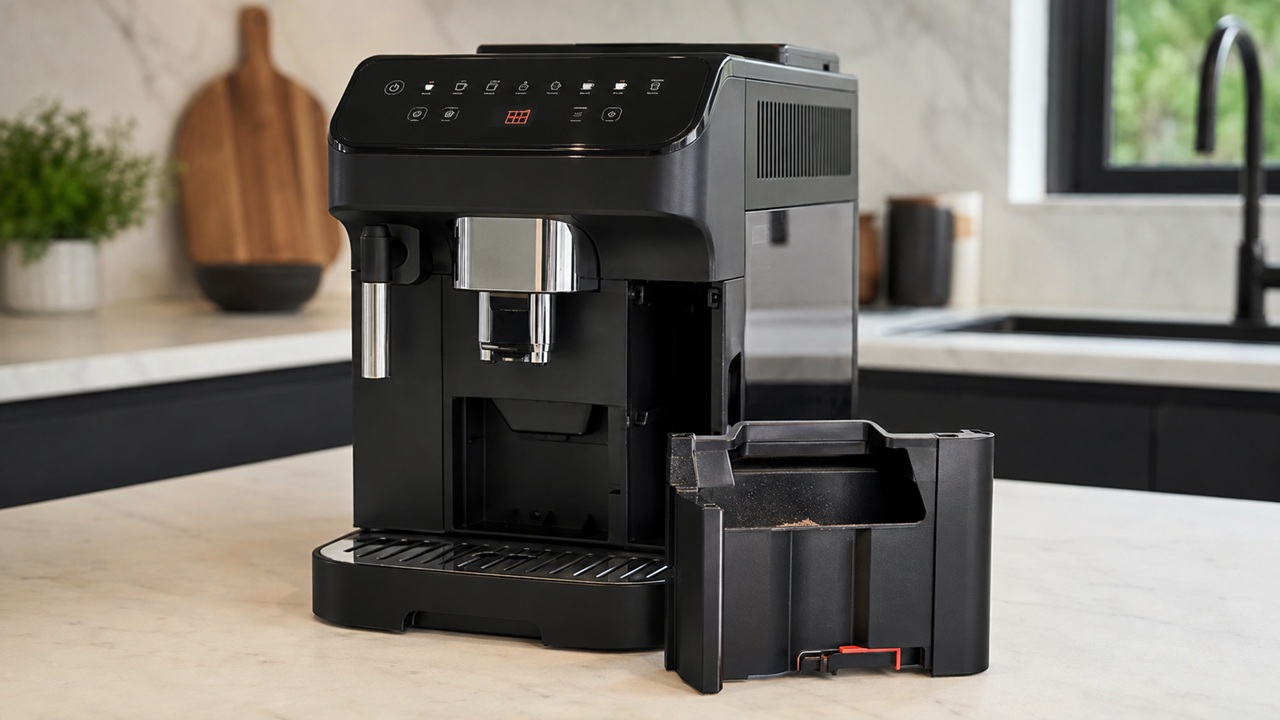
You can empty the coffee-puck bin, slide it back into the machine and still see the DeLonghi Magnifica Evo grounds container light. That does not necessarily mean the container is dirty, full or broken. On the ECAM29084SB, the machine keeps track of grounds-container use electronically, and the way you empty it matters.
The most important detail is easy to miss: empty the grounds container while the Magnifica Evo is switched on. De’Longhi explains that if the bin is emptied while the machine is off, the machine may not register the emptying and can continue asking you to empty it even when it is already clean.
This guide is for the U.S. ECAM29084SB Magnifica Evo with LatteCrema. It covers the grounds-container light staying on, the light returning too soon, the machine acting as if the bin is full when it is not, and the related INSERT GROUNDS CONTAINER condition. If you are not sure which panel symbol you are looking at, identify it first in the Magnifica Evo warning lights guide.
The 60-second fix to try first
- Turn the Magnifica Evo on and let it reach its normal ready state.
- Pull out the complete drip-tray assembly with the grounds container installed.
- Remove the grounds container and empty it completely, even if there are only a few pucks inside.
- Wipe away loose grounds that could stop the container or tray from sitting flat.
- Reinstall the grounds container in the drip tray.
- Push the complete assembly fully back into the machine.
- Wait for the panel to update before starting another drink.
If the light goes out, nothing else needs replacing. The machine simply needed to register a proper emptying cycle.
Why the grounds container light can be on when the bin is not full
The ECAM29084SB grounds container holds roughly 14 used coffee doses, but the warning is not a miniature scale that weighs the pucks. De’Longhi says its automatic machines can request an emptying after a programmed number of coffees or after a time interval. That is why the warning may appear while the container still looks only partly full.
In other words, do not judge the warning only by how much coffee you can see in the bin. The machine is trying to manage hygiene and prevent grounds from remaining inside for too long, not merely prevent an overflowing pile of pucks.
De’Longhi’s U.S. FAQ specifically states that the container should be emptied with the machine switched on so the emptying is recognized. You can compare that behavior with the official De’Longhi grounds-container guidance.
If you emptied it with the machine off
This is the first thing I would correct before cleaning sensors, resetting settings or ordering parts. If you removed and emptied the container while the machine was powered down, put everything back together, switch the machine on and repeat the emptying process while it is running.
You do not need to make another 10 or 14 coffees first. The goal is simply to let the machine see a proper remove-and-reinsert event while its control system is awake.
Grounds container light comes back very quickly
If the warning clears correctly but returns sooner than you expect, look at what the machine has actually done since the last reset. Double drinks, interrupted cycles and automatic rinsing can make the inside of the tray look different from the neat stack of dry pucks you may be expecting.
Also remember that the warning is partly a usage counter rather than a visual fullness detector. A light that returns after normal machine use is not automatically a fault just because the bin still has spare physical space.
What is abnormal is a light that never clears after a correct on-machine emptying, or an INSERT GROUNDS CONTAINER warning that appears while the tray and bin are visibly installed correctly. Those cases need a different diagnosis.
If the machine says INSERT GROUNDS CONTAINER
An INSERT GROUNDS CONTAINER condition means the machine does not believe the container is correctly present. Start with positioning before assuming an electronic failure.
- Remove the complete drip tray.
- Lift the grounds container out of the tray.
- Check the bin and tray for a coffee puck, wet grounds or debris trapped where the container sits.
- Place the grounds container back into its molded position in the tray.
- Make sure it sits flat rather than tilted on one edge.
- Slide the complete tray assembly straight into the machine until it reaches its normal stop.
Do not slam the tray or hold it inward with constant pressure. If the machine only recognizes the grounds container while you push hard on the front of the tray, that is useful evidence of a positioning or detection problem, not a reason to wedge the tray permanently in place.
Check the drip tray, not only the coffee bin
The grounds container does not enter the machine independently; it rides in the drip-tray assembly. A slightly mis-seated tray can therefore create a grounds-container symptom even when the plastic bin itself is perfectly fine.
Remove loose coffee from the tray rails and the area where the bin rests. Check that the tray grille and other removable pieces are assembled normally and that nothing is preventing the tray from reaching its usual depth. If the tray suddenly became difficult to insert after you removed the infuser, stop forcing it: an infuser that is parked in the wrong position can interfere with the tray.
A dirty container can cause seating problems
Wet coffee residue tends to build up where the grounds container meets the drip tray, especially if pucks break apart or water reaches the bin during rinse cycles. A thick ridge of compacted grounds can leave the container sitting slightly proud even though it looks installed from the front.
Wash the removable grounds container and drip tray using the model-appropriate cleaning method, then dry the contact and seating areas before reinstalling them. The broader Magnifica Evo cleaning guide covers routine tray, infuser and internal-compartment care without turning this warning-light diagnosis into another general cleaning article.
What about the grounds-container microswitch?
This is where the ECAM29084SB becomes more interesting than a generic “empty the bin” answer. De’Longhi has published a technical bulletin for certain Magnifica Evo ECAM290.8x machines equipped with a milk carafe describing a limited number of abnormal INSERT GROUNDS CONTAINER alarms.
In those cases, the fault involved the mechanism that actuates the grounds-container microswitch. The important takeaway for an owner is not to start bending tabs or adjusting switches. It is that a correctly installed container can, in some cases, still produce a genuine detection fault.
If your machine recognizes the container only intermittently, loses recognition during coffee or milk preparation, or continues showing INSERT GROUNDS CONTAINER after repeated correct seating, record that exact behavior for De’Longhi support. It gives them much more useful information than simply saying “the light won’t go away.”
How to tell a counter problem from a detection problem
| Symptom | More likely explanation | Best next step |
|---|---|---|
| Bin is partly full and light asks to empty it | Normal programmed count/time reminder | Empty it completely with machine on |
| Bin was emptied while machine was off and light stays on | Emptying was not registered | Repeat emptying with machine on |
| Light clears after correct emptying | Normal behavior | No repair needed |
| INSERT GROUNDS CONTAINER after cleaning | Container/tray not fully seated | Remove, inspect and reinstall assembly |
| Machine only detects container if tray is pushed hard | Positioning or detection issue | Stop forcing; inspect tray seating and seek service if persistent |
| Warning appears during a drink with bin correctly installed | Possible intermittent detection fault | Document timing and contact support if repeatable |
| Container is cracked or its locating feature is damaged | Physical container problem | Verify exact replacement part |
Do not factory-reset the machine for this first
A factory reset changes stored beverage settings; it does not make a crooked tray sit flat, remove packed coffee from underneath the bin or repair a container-detection switch. If the grounds light is the only problem, a reset adds variables without addressing the most likely causes.
Likewise, unplugging the machine for 30 seconds may restart the electronics, but it does not replace the required empty-with-machine-on event. Use the behavior of the light after a correct emptying as your diagnostic clue.
When does the grounds container itself need replacing?
The plastic container is a plausible replacement only when there is a physical reason to suspect it: a crack, distortion, damaged locating feature or another defect that prevents it from sitting correctly in the tray. A persistent light by itself is not enough evidence.
For the ECAM29084SB, the grounds container is one of the owner-replaceable items already cataloged in the Magnifica Evo replacement parts guide. Verify the current part reference against your exact machine before buying; do not use a visually similar bin from another ECAM family as a diagnostic shortcut.
When to stop troubleshooting
Owner-level checks have reached their useful limit when the machine repeatedly fails one of these tests:
- The container is emptied completely while the machine is on, but the empty-container warning never clears.
- The drip tray and grounds container are clean, undamaged and fully seated, yet INSERT GROUNDS CONTAINER remains.
- The container is recognized at first and then becomes “missing” during coffee or milk preparation.
- The tray must be pushed, lifted or held in an abnormal position for the warning to disappear.
- A known-correct replacement grounds container produces exactly the same detection problem.
- The grounds-container warning appears together with a general alarm, abnormal mechanical noise or another persistent fault.
At that point, the remaining diagnosis can involve the detection mechanism rather than routine cleaning. Do not remove the outer housing to reach a microswitch. Use De’Longhi support or an authorized service center and describe exactly when the machine stops recognizing the bin.
Common mistakes that keep the light on
- Emptying the bin with the machine off: the machine may not record it.
- Removing only some pucks: empty the container completely when the machine requests it.
- Putting the bin back slightly crooked: it must sit correctly in the drip tray.
- Ignoring wet grounds underneath it: residue can change how the container seats.
- Forcing the tray: resistance is a symptom to investigate, not something to overpower.
- Buying a new bin immediately: a detection fault can remain even with a perfect container.
- Using factory reset as a first fix: this warning is usually about counting, positioning or detection, not drink programming.
Magnifica Evo grounds container light FAQs
Why does my Magnifica Evo say the grounds container is full when it is not?
The warning is not based only on visible fullness. De’Longhi programs its automatic machines to request emptying after a number of coffees or a time interval. Empty the container completely while the machine is switched on so the action is registered.
Why is the grounds container light still on after I emptied it?
If you emptied it while the machine was off, repeat the process with the Magnifica Evo on. If it was already emptied correctly with the machine on, remove the drip tray again and check that the grounds container is clean, seated flat and fully reinserted with the tray.
What does INSERT GROUNDS CONTAINER mean?
It means the machine is not detecting the container in its expected position. Reinstall the grounds container in the drip tray and insert the complete assembly fully. If the message persists despite correct seating, an intermittent or failed detection mechanism becomes more plausible.
Can the Magnifica Evo grounds container sensor fail?
Yes, a genuine detection problem is possible. De’Longhi has documented limited abnormal INSERT GROUNDS CONTAINER cases on some Magnifica Evo ECAM290.8x milk-carafe machines involving the grounds-container microswitch mechanism. That is a service issue, not a reason to bypass or adjust the switch yourself.
How many pucks fit in the ECAM29084SB grounds container?
De’Longhi lists the ECAM29084SB grounds-container capacity at approximately 14 coffee doses. The machine may still request emptying before the bin appears physically packed because the reminder also depends on its programmed counting and timing logic.
Should I replace the grounds container if the light will not go out?
Only if the container is physically damaged, distorted or cannot seat correctly. If a clean, undamaged bin is correctly installed and the machine still does not recognize it, replacing the bin may not solve an internal detection fault.
If this light is appearing together with other symptoms and the grounds container is not clearly the root problem, use the Magnifica Evo troubleshooting hub to branch by what the machine is actually failing to do.