
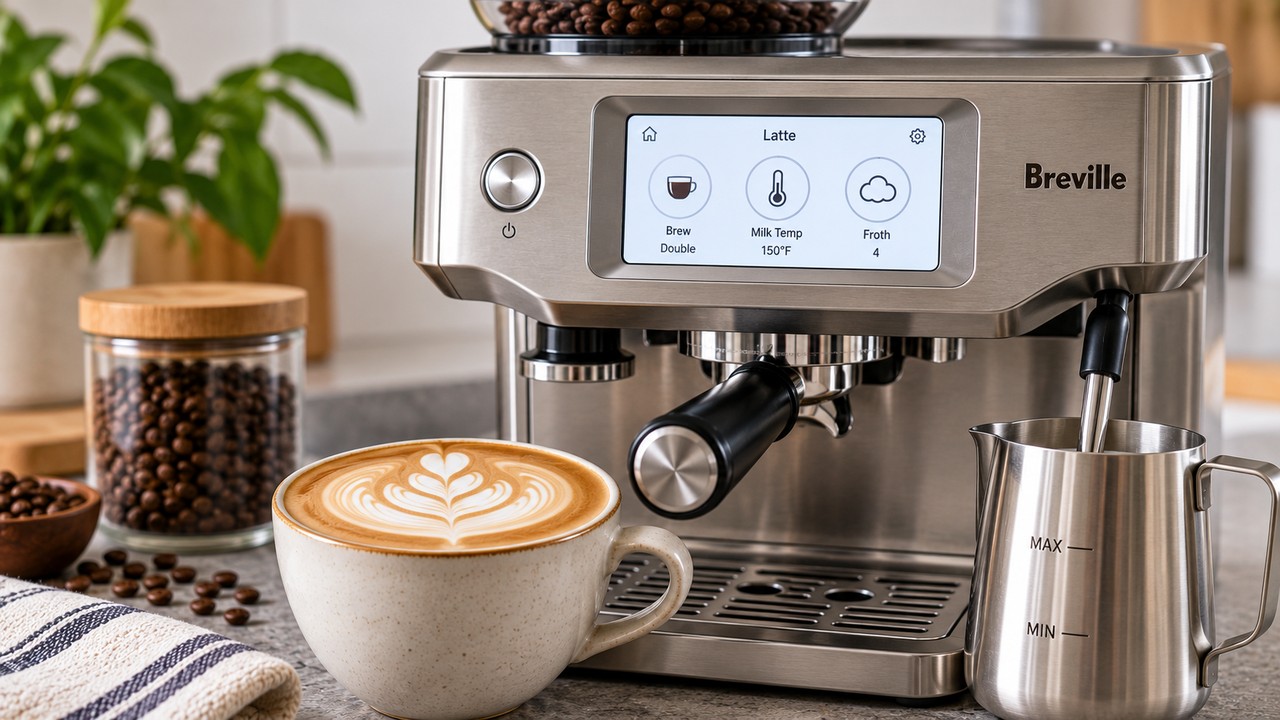
A good starting point for Breville Barista Touch latte settings on the BES880 is a double espresso, 150°F milk temperature and froth level 4. From there, adjust the milk temperature or texture one step at a time to suit your cup size and milk.
Those numbers are a practical starting point rather than a universal factory setting. The Barista Touch lets you customize milk temperature across a wide range and choose from eight texture levels, so the best latte setting is the one that gives you silky microfoam without overwhelming the espresso.
This guide covers the original Breville Barista Touch BES880. It does not cover the newer Barista Touch Impress BES881.
Best Breville Barista Touch Latte Settings
| Setting | Recommended starting point |
|---|---|
| Drink | Latte |
| Espresso | Double |
| Coffee dose | About 18 g |
| Grind size | Start around 14, then dial in |
| Milk temperature | 150°F / 65°C |
| Froth level | 4 |
| Cup size | About 8–10 oz |
| Milk | Cold whole milk or your preferred alternative |
If the espresso itself is running too quickly or slowly, fix the extraction before trying to compensate with milk. Our Breville Barista Touch grind size guide explains how to dial in the BES880 from Breville’s level-14 starting point.
Why Start at 150°F and Froth Level 4?
A latte needs enough microfoam to create a smooth, creamy texture but less dry foam than a traditional cappuccino. Starting around 150°F with froth level 4 keeps the milk hot while still aiming for the silky texture that works well in a latte.
The BES880 allows milk-temperature adjustment from approximately 104°F to 167°F and provides eight texture levels. That large range is useful, but it also means there is no reason to jump immediately to an extreme setting.
Start in the middle, taste the drink, and make small changes. A five-degree temperature adjustment or one froth-level change is usually much easier to evaluate than changing several settings at once.
Espresso Setting for a Latte
For a normal latte, use the Double brew setting. Breville’s own café latte recipe also uses a double espresso before adding microfoamed milk.
The BES880’s 54 mm portafilter is designed around an approximately 18 g dose when using the double basket. A properly dialed-in double shot gives the coffee enough intensity to remain noticeable after the milk is added.
If your latte tastes mostly like hot milk, do not automatically make the milk hotter or foamier. First check that the espresso is extracting properly and that you are not using far more milk than the coffee can support.
Best Milk Temperature for a Barista Touch Latte
For dairy milk, 145–150°F is a useful latte range, with 150°F being an easy starting setting on the touchscreen.
If you prefer a hotter drink, increase the setting gradually. The Barista Touch can go considerably hotter, but choosing the maximum temperature simply because it is available does not necessarily produce a better latte.
| Result | What to try |
|---|---|
| Latte feels too cool | Increase milk temperature by about 5°F |
| Temperature is comfortable | Keep the current setting |
| Milk tastes overly cooked | Reduce temperature by about 5°F |
| You want to drink it immediately | Try 140–145°F |
| You prefer a hotter latte | Try around 150–155°F |
The temperature number is not a quality score. Choose the lowest setting that gives you the drinking temperature you enjoy while preserving a smooth milk texture.
Best Froth Level for a Latte
Start around froth level 4. This gives the automatic steam wand enough aeration to create noticeable microfoam without deliberately aiming for a thick cappuccino-style foam cap.
If the latte is too flat and feels like espresso mixed with plain hot milk, increase the froth level by one. If it is unusually airy or develops a thick layer of foam on top, reduce the setting by one.
| Milk result | Adjustment |
|---|---|
| Too little texture | Increase froth one level |
| Silky microfoam | Keep the setting |
| Too airy or foamy | Reduce froth one level |
| Large visible bubbles | Check milk, jug position and steam-wand condition |
The goal is not simply to create as much foam as possible. Latte milk should remain pourable and integrated rather than separating immediately into hot liquid milk and a thick dry foam layer.
How to Make a Latte on the Breville Barista Touch
- Turn on the BES880 and select Latte from the drink menu.
- Use the double basket and prepare a properly dialed-in dose.
- Select Double for the espresso.
- Extract the espresso into your cup.
- Fill the stainless-steel milk jug with fresh cold milk.
- Place the jug on the temperature sensor with the steam wand fully lowered.
- Set milk temperature to approximately 150°F.
- Start with froth level 4.
- Touch Milk and allow the automatic cycle to finish.
- Swirl the jug briefly and pour the textured milk into the espresso.
The BES880 automatically stops steaming when the selected milk temperature is reached. After removing the jug, wipe the steam wand immediately and lower it so the automatic purge can run.
How Much Milk Should You Use?
The right amount depends more on your cup than on a hidden Barista Touch setting. For a typical 8–10 oz latte, a double espresso topped with enough textured milk to fill the cup provides a useful starting ratio.
A larger cup dilutes the same double espresso with more milk. If a 12 oz or larger latte tastes weak, reducing the amount of milk can improve coffee intensity without changing the machine programming.
Do not overfill the milk jug before steaming. Milk expands as air is incorporated, so leave room for the volume to increase.
Whole Milk Latte Settings
Cold whole milk is an easy baseline for learning the BES880 automatic steam system because it generally produces stable, creamy microfoam.
Start at 150°F and froth 4. If you want a flatter, silkier drink, try froth 3. If you prefer a slightly airier latte, try level 5 before making more dramatic changes.
Oat, Almond and Other Alternative Milk Settings
Plant-based milks do not all behave the same way. Even two oat milks can texture differently because their protein, fat and stabilizer content varies by brand.
Start with cold milk and consider using a slightly lower temperature than you use for dairy milk. Then adjust the froth one level at a time according to the texture you actually see in the jug.
Barista-formulated versions of oat, almond and other milk alternatives are generally designed to foam more predictably. Breville also specifically notes that different brands and types of milk may require different froth settings.
Latte vs. Flat White vs. Cappuccino Settings
The espresso base can be similar across these drinks, but the milk ratio and texture should not be identical.
| Drink | Milk style | General direction |
|---|---|---|
| Flat White | Thin, silky microfoam | Less froth |
| Latte | Silky microfoam with moderate body | Medium froth |
| Cappuccino | More aerated milk | More froth |
Do not worry if your preferred latte ends up one texture level away from somebody else’s. Milk choice, cup size and personal preference matter more than matching another owner’s screen exactly. If you want to use the BES880 for more than a standard latte, see our Breville Barista Touch recipes for flat white, cappuccino, mocha, cortado, iced drinks and more.
How to Save Your Latte Settings
Once you have a combination you like, the BES880 can save customized drinks so you do not need to re-enter your preferred settings every morning.
Adjust the latte’s grind duration, brew selection, milk temperature and froth level, then use the on-screen save option to store the customized drink. The Barista Touch can save up to eight personalized coffees.
For the broader touchscreen controls, Settings menu, factory reset and first-use instructions, see our Breville Barista Touch manual guide.
If the Automatic Milk Texture Is Inconsistent
Before changing your saved latte settings, make sure the milk jug is positioned correctly on the temperature sensor, the steam wand is fully lowered, the milk covers the ring around the wand tip and you are starting with cold milk.
Breville also recommends briefly purging the steam wand before texturing. After steaming, wipe the wand and return it to the lowered position so the automatic purge can clear residual milk.
If the steam wand is not producing normal foam, the temperature sensor is not responding or the machine behaves differently despite correct settings, use our Breville Barista Touch troubleshooting guide instead of continually changing the latte preset.
Breville Barista Touch Latte Settings FAQ
What are the best Breville Barista Touch latte settings?
A useful BES880 starting point is a double espresso with milk at approximately 150°F and froth level 4. Adjust temperature by about 5°F or texture by one level at a time according to your milk and preference.
What milk temperature should I use for a latte?
Start around 145–150°F for dairy milk. The BES880 offers a much wider adjustable range, but you do not need to use the hottest setting to make a good latte.
What froth level should I use for a latte?
Try froth level 4 as a starting point. Move down if the milk is too foamy or up one level if it lacks enough microfoam.
Should I use a single or double shot for a latte?
A double espresso is the better starting point for a typical latte and is also what Breville uses in its official café latte recipe.
Why does my Barista Touch latte taste weak?
Check the espresso extraction and milk quantity before increasing milk temperature or froth. A poorly extracted shot or too much milk can make the coffee taste weak even when the milk settings are correct.
Can I save custom latte settings on the BES880?
Yes. The Barista Touch lets you customize and save drinks, with storage for up to eight personalized coffees.