
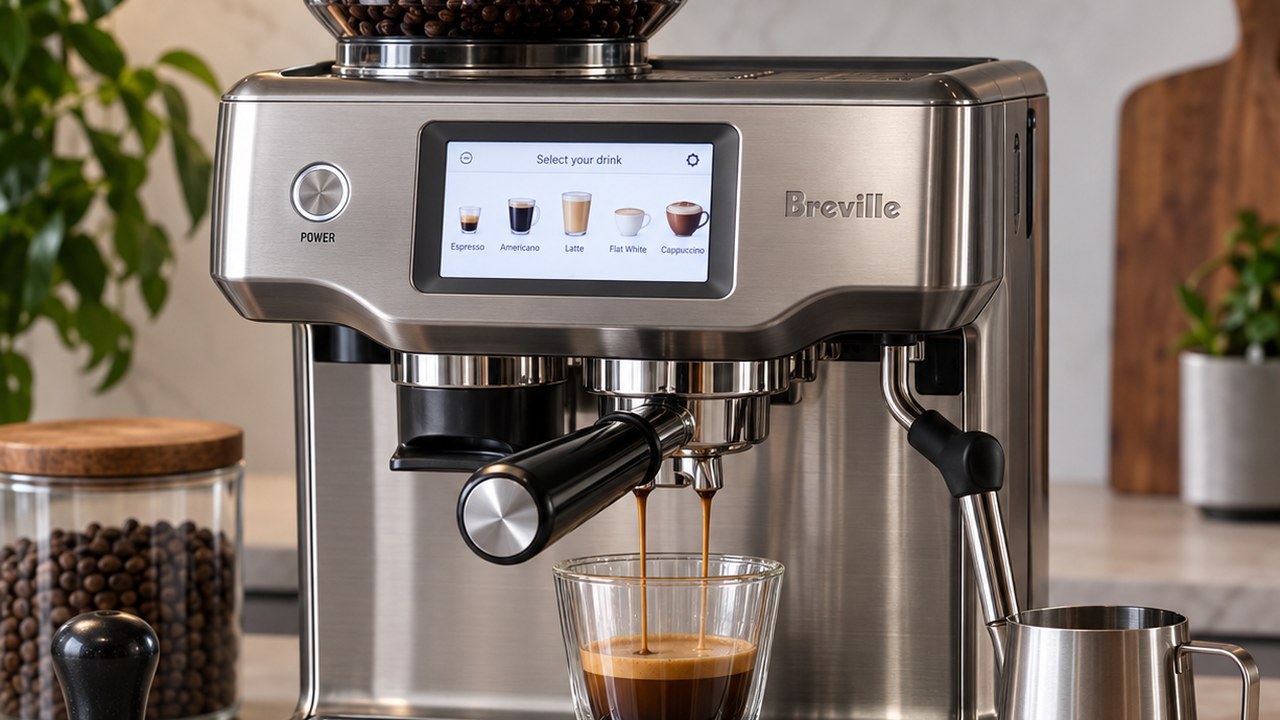
If you need the Breville Barista Touch manual but do not want to search through the full instruction book every time you need a control or setting, this guide covers the everyday functions of the BES880 in one place.
This page is specifically for the Breville Barista Touch BES880. It does not cover the newer Barista Touch Impress BES881, which has different controls and operating features. If you are confirming the model, machine size or counter clearance, see our Breville Barista Touch dimensions and specs guide.
Below you will find the BES880 touchscreen controls, first-use steps, basic brewing operation, milk controls, hot-water function, settings menu, manual extraction and factory reset information.
Official Breville Barista Touch BES880 Manual
If you need the complete manufacturer instruction book, you can also view the official Breville Barista Touch BES880 manual (PDF). The guide below is designed as a faster reference for the controls and everyday functions most owners need.
Breville Barista Touch BES880 Quick Reference
| Function | Where to control it | What it does |
|---|---|---|
| Power | POWER button | Turns the BES880 on or off |
| Drink selection | Touchscreen Home menu | Select Espresso, Americano, Latte, Flat White or Cappuccino |
| Grinding | Grind control on screen / portafilter cradle | Starts automatic or manual dosing |
| Grind size | Physical dial on the side | Changes the grinder from finer to coarser |
| Espresso | Brew control | Select Single, Double or Custom extraction |
| Milk | Milk control on screen | Adjusts milk temperature and froth level |
| Hot water | Hot Water control | Dispenses water from the dedicated outlet |
| Settings | Settings icon | Opens machine setup, cleaning, temperature and reset options |
Breville Barista Touch Manual: First Use
Before making your first coffee, remove the packaging and wash the water tank, portafilter, filter basket and milk jug with warm water and a mild dishwashing liquid. Rinse and dry them thoroughly.
1. Install the water filter
Remove the filter and filter holder from their packaging. Soak the filter in cold water for about five minutes, rinse the holder, assemble the two pieces and lock the holder into the adapter inside the water tank.
Breville recommends replacing the filter after approximately three months or 10.6 US gallons (40 liters) of water. Use cold water in the tank and avoid distilled or very low-mineral water, because the machine relies on appropriate mineral content for normal operation and coffee flavor.
2. Turn on the machine
Press the POWER button. The touchscreen will take you through the initial setup and ask for information such as water hardness.
Once setup is complete, the BES880 displays a guide that can walk you through making your first coffee. You can return to this Quick Start Guide later from the Settings menu.
Understanding the BES880 Touchscreen
The touchscreen is the main control center for the Barista Touch. From the Home screen, swipe through the available drinks and select the one you want to prepare.
The standard drink menu includes Espresso, Americano, Latte, Flat White and Cappuccino. After selecting a drink, the screen changes to the drink-control view.
Depending on the selected drink, the screen can display grind duration, brew selection, milk temperature and milk froth level. The machine also shows the selected grind size, although the grind size itself is changed with the physical dial on the side of the machine.
Keep the touchscreen clean and dry. Moisture on the display can interfere with normal touch operation.
Preheat and Purge Before Brewing
Before the first extraction, preheat the cup, portafilter and filter basket with hot water. Dry the portafilter and basket thoroughly before adding ground coffee, since moisture can contribute to uneven extraction.
Before locking the portafilter into the group head, touch Brew briefly without the portafilter installed to run a short flow of water through the group head. This helps stabilize the brewing temperature before extraction.
How to Use the Breville Barista Touch BES880
For a normal espresso or milk-based drink, the basic BES880 workflow is straightforward:
- Press POWER and select a drink from the touchscreen.
- Insert the appropriate filter basket into the 54 mm portafilter.
- Select the corresponding single or double basket option on the screen.
- Grind the coffee directly into the portafilter.
- Distribute and tamp the coffee evenly.
- Lock the portafilter into the group head.
- Select the required Brew option.
- For a milk drink, place the milk jug on the temperature sensor and start the Milk function.
If you are using freshly ground whole beans, use a Single Wall basket. The Dual Wall baskets are intended primarily for pre-ground coffee.
The grind setting has a major effect on extraction, but choosing specific grind numbers for different beans is a separate adjustment process rather than a fixed BES880 manual setting.
Single, Double and Custom Brew Controls
After the portafilter is locked into the group head, touch Brew on the screen. The BES880 allows you to choose Single, Double or Custom extraction.
The factory-guided reference is approximately 1 fl oz (30 ml) when using a 1 CUP basket and approximately 2 fl oz (60 ml) when using a 2 CUP basket, although the actual amount in the cup can vary with the coffee dose and grind.
You can stop a preset extraction early by touching Brew again.
Manual espresso extraction
The BES880 also has a manual extraction mode. Press and hold the Brew control for about two seconds to enter manual mode. Touch Brew to start the extraction and touch it again when you want to stop.
Breville Barista Touch Manual Milk Controls
For automatic milk texturing, start with cold milk and place the stainless-steel milk jug on the temperature sensor built into the drip-tray area. Lower the steam wand fully into position.
The milk should cover the marked ring near the steam-wand tip. The touchscreen indicates whether the jug is positioned correctly.
Select the desired milk temperature and froth level, then touch Milk. The BES880 monitors the milk temperature and stops automatically when the selected temperature is reached. If you are making lattes and want a practical starting point for temperature, froth and espresso setup, see our Breville Barista Touch latte settings guide.
Before texturing milk, Breville recommends briefly purging the steam wand by starting the Milk function and then stopping it again. Continuous steaming is automatically disabled after approximately 90 seconds.
After removing the jug, wipe the steam wand and tip with a clean damp cloth. Lowering the wand back into its normal position triggers the automatic purge.
Manual milk texturing
You can also texture milk manually. Lift the steam wand and start steam using the Milk control. In manual mode, automatic milk-temperature shutoff is disabled, so touch Milk again when you want to stop steaming.
Americano and Hot Water Controls
The BES880 includes three preset Americano sizes: Small at approximately 6 fl oz (180 ml), Medium at 8 fl oz (240 ml) and Large at 12 fl oz (360 ml).
For an Americano, position the cup so it can receive both the dedicated hot-water outlet and the espresso from the portafilter. The machine dispenses the hot water and then extracts the espresso.
You can also use Hot Water independently for preheating cups or dispensing water manually. The hot-water cycle is limited to about 90 seconds, and the BES880 cannot dispense hot water and extract espresso at the same time.
Breville Barista Touch Settings Menu
Open the Settings menu from the icon in the upper-right area of the touchscreen. This menu contains the machine-level options rather than the settings for an individual drink.
| Setting | Purpose |
|---|---|
| Quick Start Guide | Runs the on-screen coffee preparation guide again |
| Language and units | Changes language and °F/°C display |
| Clean Cycle | Starts the group-head cleaning cycle |
| Cleaning Steam Wand | Displays the steam-wand cleaning procedure |
| Descale Cycle | Starts the guided descaling process |
| Brew Temperature | Changes the espresso extraction temperature setting |
| Default Milk Temperature | Changes the default temperature for milk-based drinks |
| Water Hardness | Sets the water hardness used for maintenance reminders |
| Screen Brightness | Adjusts touchscreen brightness |
| Sound Volume | Changes alert and reminder volume |
| Demo Mode | Runs the touchscreen demonstration sequence |
| Factory Reset | Restores programmable settings and removes saved custom drinks |
How to Save a Custom Drink
The BES880 lets you create and save customized drinks. From the drink menu, select Add New, choose a standard drink as the starting point and adjust the available parameters.
You can also change a drink manually and then use the save control to store those settings for future use.
Be aware that performing a Factory Reset deletes saved custom drinks along with other programmable changes.
Breville Barista Touch Auto-Off
The BES880 automatically enters Auto Off mode after approximately 30 minutes of inactivity. This is normal behavior and does not indicate a fault with the machine.
When the Manual Is Not Enough
This page is intended as an operating reference for the BES880 rather than a troubleshooting or repair manual. If the machine is not behaving as the controls above describe, use the guide that matches the problem instead.
- For error messages, grinder problems, steam issues, weak flow and other symptoms, see our Breville Barista Touch troubleshooting guide.
- For service decisions, internal faults and repair options, see Breville Barista Touch repair.
- For replacement seals, portafilters, baskets, burrs, water tanks and other components, use our Breville Barista Touch parts guide.
Breville Barista Touch BES880 Manual FAQ
Is this manual guide for the BES880 or BES881?
This guide is for the original Breville Barista Touch BES880. The Barista Touch Impress BES881 is a different model and should not be treated as interchangeable when following operating instructions or identifying parts.
Does the Breville Barista Touch have an on-screen manual?
Yes. The BES880 includes an on-screen Quick Start Guide that walks through preparing a coffee. You can reopen it later from the Settings menu.
Can you brew manually on the Barista Touch?
Yes. Hold the Brew control for about two seconds to enter manual extraction mode, then touch Brew to start and touch it again to stop.
Can you use pre-ground coffee in the BES880?
Yes. Use the Dual Wall filter basket when using pre-ground coffee. The Single Wall baskets are designed for freshly ground whole coffee beans.
How do you factory reset a Breville Barista Touch?
Open the Settings menu and select Factory Reset. This restores programmable values to their factory settings and deletes saved custom drinks.
Why does my Barista Touch turn itself off?
The BES880 normally enters Auto Off mode after about 30 minutes. If it shuts down unexpectedly while you are actively using it, that is a different issue and should be diagnosed separately.