
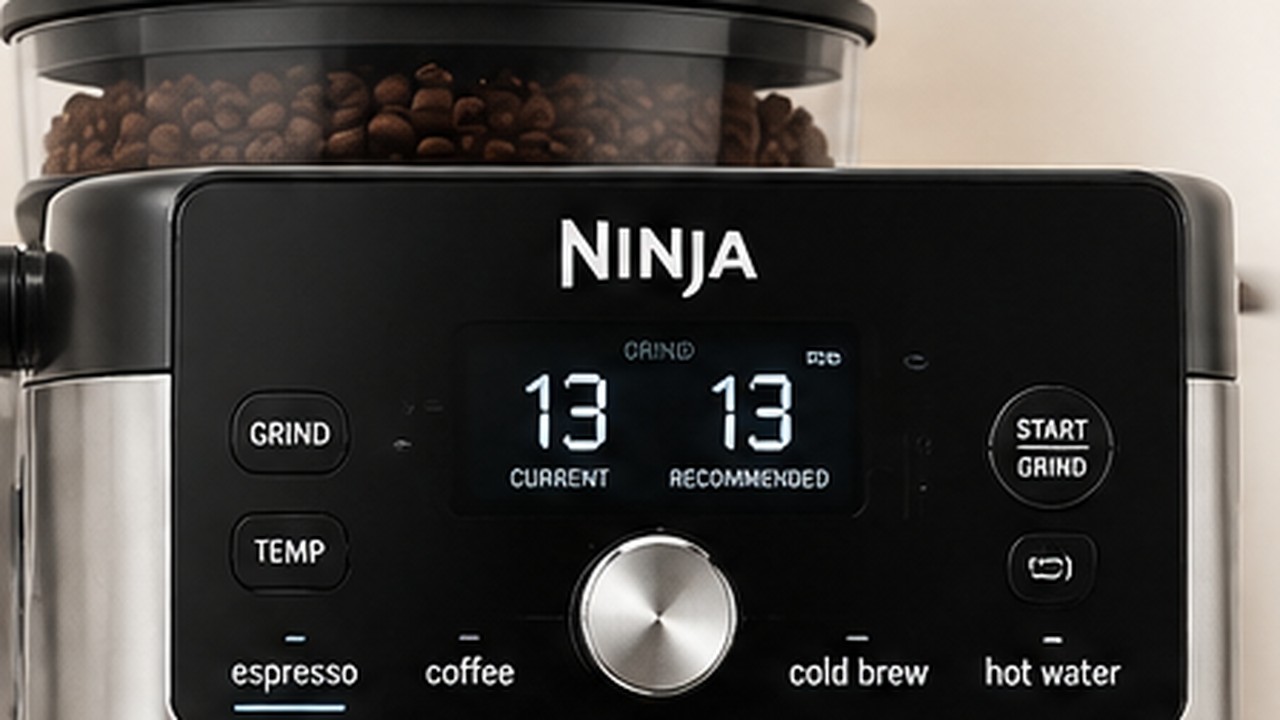
The Ninja Luxe Café Pro ES701 has 25 grind settings: setting 1 is the finest and setting 25 is the coarsest. Lower numbers are generally more suitable for espresso, while higher numbers are used for coarser coffee grinds, but there is no single best grind number that works for every bag of beans.
The best starting point is the grind size shown by Barista Assist Technology. Match the physical grinder dial to the recommended number before grinding, then let the ES701 monitor the extraction. The recommendation may change after the next shot, especially when you start using new beans.
Ninja Luxe Café Pro grind size chart
| Grind setting | What it means | Typical use |
|---|---|---|
| 1 | Finest setting | Very fine end of the grinder range |
| Lower numbers | Finer grounds | Generally better suited to espresso |
| Recommended number | Barista Assist target | Best starting point for the selected beans and brew |
| Higher numbers | Coarser grounds | Generally better suited to coffee brews |
| 25 | Coarsest setting | Coarse end of the grinder range |
This is deliberately not a chart that assigns one exact number to espresso, coffee or Cold Brew. Two bags of beans can require different grind settings even when you make the same drink on the same ES701.
What grind size should I use on the Ninja Luxe Café Pro?
Start with the number the ES701 recommends on its display.
- Select the drink you want to make.
- Install the correct basket and place the portafilter in the grinding cradle.
- Look at the recommended grind size on the control panel.
- Turn the physical grind dial until the current setting matches that recommendation.
- Press START GRIND.
- Tamp and brew normally.
- Check the recommendation again before the next espresso.
If you are setting up the grinder specifically for an Americano, see our Ninja Luxe Café Pro Americano guide for the correct basket, size, strength and brewing steps.
The machine does not simply choose one permanent espresso setting. Barista Assist uses information from the brew to refine its next recommendation.
Best Ninja Luxe Café Pro grind size for espresso
There is no universal ES701 espresso grind number such as 5, 10 or 15 that will be correct for every coffee bean.
Espresso normally uses the finer part of the grinder range, so the recommended number will generally be lower than the number used for drip coffee. The exact setting can change with the bean, roast, freshness and how the previous espresso extracted.
If your machine recommends 12 for one bag and 17 for another, that does not automatically mean something is wrong. Follow the recommendation first and evaluate the resulting espresso rather than copying someone else’s grind number.
Why does my Ninja Luxe Café Pro grind size keep changing?
A changing grind recommendation is usually normal behavior, not a grinder fault.
Barista Assist monitors the brew and can adjust the recommended grind size for the next espresso. The idea is to move the extraction toward a better result rather than forcing the machine to use the same number indefinitely.
Ninja also warns that the recommendation can change as coffee beans age. Beans do not behave exactly the same throughout an open bag, so a grind setting that worked earlier may not remain the machine’s preferred setting later.
New beans can take 2–3 espressos to dial in
Do not expect the first espresso from a completely different bag of beans to establish the final grind setting.
When using new beans for the first time, Ninja says it can take 2–3 espresso brews for the system to reach an optimal grind recommendation.
That means a sequence such as 14, then 13, then 12 is not necessarily a problem. The ES701 may simply be dialing in the new coffee based on the extraction results it is seeing.
What happens when you change coffee beans?
Different beans can require substantially different grind settings. Roast level, bean density, freshness and the individual coffee itself all affect how water flows through an espresso puck.
If you switch beans, clear the old beans from the hopper and grinder before expecting Barista Assist to adapt to the new coffee.
- Unlock and remove the bean hopper.
- Pour out the remaining old beans.
- Reinstall and lock the empty hopper.
- Place the portafilter in the grinding cradle.
- Use START GRIND to clear beans remaining in the grinder.
- Add the new beans.
- Allow the next few espresso brews to dial in the new grind recommendation.
How to change the grind size on the ES701
The number on the display is a recommendation. The physical grind size is changed with the grinder dial on the side of the machine.
- Select your brew before grinding.
- Insert the portafilter correctly into the grinding cradle.
- Read the recommended grind number on the control panel.
- Turn the side grind dial toward a lower number for a finer grind or a higher number for a coarser grind.
- Stop when the current grind setting matches the recommended setting.
- Press START GRIND.
If you make a large change from a very coarse setting to a very fine setting, or the other way around, you may briefly hear the grinder operate while you adjust it. The ES701 can do this to help prevent the grinder from jamming.
What do CURRENT and RECOMMENDED grind size mean?
These two values are easy to confuse.
| Display | Meaning |
|---|---|
| CURRENT | The grind size the physical grinder dial is currently set to. |
| RECOMMENDED | The grind size Barista Assist wants you to use for the selected brew. |
If the machine recommends 13 but the grinder is physically set to 17, turn the grind dial until CURRENT reaches 13 before grinding.
Should you always follow Barista Assist?
For most ES701 owners, especially when learning the machine or trying new beans, the recommended setting is the best place to start.
However, the ES701 also allows you to choose your own setting from all 25 grind positions. If the recommendation has stabilized but you consistently prefer the taste of the espresso one or two settings finer or coarser, you can experiment manually.
Make small changes rather than jumping several numbers at once. Keep the beans, basket, drink and strength setting unchanged while testing so you can tell whether the grind adjustment actually improved the espresso.
When should you use a finer grind?
A finer grind creates more resistance to the water passing through the coffee puck.
If your espresso runs unusually fast, looks thin and tastes weak or under-extracted, a slightly finer setting may improve extraction.
On the ES701, moving to a finer grind means turning toward a lower number.
When should you use a coarser grind?
A coarser grind reduces resistance and allows water to pass through the puck more easily.
If espresso barely comes out, only drips from the portafilter or takes excessively long to extract, the grind may be too fine for those beans.
Moving toward a higher number makes the grind coarser.
Espresso comes out too fast
If the espresso gushes through quickly and tastes weak, first check whether CURRENT matches the grind size the machine recommends.
If it already matches and you are manually dialing in the shot, try moving one setting finer and test again.
Avoid changing grind size, brew strength and temperature simultaneously. Changing one variable at a time makes it much easier to identify what fixed the shot.
Espresso is only dripping or no coffee comes out
If water can barely pass through the puck, the coffee may be ground too finely.
- Check that the grind setting matches the recommendation.
- Move slightly coarser if you are manually dialing in.
- Make sure the basket holes and group head are not blocked.
- Confirm that the water reservoir contains enough water.
If the grinder itself will not turn, is jammed, makes abnormal noises or does not dispense grounds, that is a different problem. Use our Ninja Luxe Café Pro grinder troubleshooting guide instead.
Why does the recommended number change even with the same beans?
Using the same bag does not guarantee that the recommendation will remain fixed for the life of that bag.
The ES701 can adjust its recommendation according to how previous espresso brews extracted, and Ninja specifically notes that the setting may change as the beans age.
A small change is therefore expected. You do not need to reset the machine every time the recommendation moves by one or two numbers.
What if the grind recommendation changes wildly?
If the recommendation is making large, repeated jumps even though you are using the same beans and brewing the same drink, check the basics before assuming Barista Assist has failed.
- Make sure CURRENT actually matches RECOMMENDED before each grind.
- Use the same basket while comparing shots.
- Keep the brew type and strength setting consistent.
- Make sure you have not just changed or topped up the beans.
- Check that the grinder chute and basket are clean.
If the behavior remains obviously inconsistent after several brews, you can reset Barista Assist and allow it to dial in again.
How to reset the ES701 grind recommendation
The ES701 Additional Settings menu includes a Barista Assist reset.
- Turn the machine on.
- Press and hold the SIZE button for about 3 seconds to open Additional Settings.
- Navigate to h04 — Barista Assist Technology Reset.
- Select the reset option and confirm it.
- Return to normal operation and allow the machine to dial in the beans again.
Use this as a troubleshooting step, not as something you need to do whenever the recommended grind size changes normally.
Can you turn off the recommended grind size?
Yes. The ES701 Additional Settings menu includes an option for the recommended grind-size display.
The h03 Recommended Grind Size setting can turn that recommendation display on or off. Leaving it enabled makes sense for most users because you can still choose your own grind size when you want to experiment.
Does roast level change the grind size?
It can. Different coffees behave differently in the grinder and during extraction, which is one reason copying another ES701 owner’s number is unreliable.
A dark roast from one brand and a light roast from a local roaster may require noticeably different settings. Even two medium roasts can dial in differently.
Use Barista Assist to establish a starting point whenever you change beans rather than assuming the previous number will carry over.
Does grind size change for drip coffee?
Yes. The ES701’s grinder is designed for both espresso and coffee, so the required grind is not the same for every brew style.
Espresso generally requires a finer grind, while filter-style coffee uses a coarser grind. Select the drink first and follow the recommendation shown for that brew rather than reusing your espresso setting.
Should you memorize your grind number?
It can be useful to remember the approximate setting that works for a favorite bag of beans, but do not treat it as permanent.
If you regularly buy the same coffee, knowing that it normally works around a particular area of the dial gives you a useful reference. Barista Assist can still make small adjustments as the beans age or extraction changes.
Common ES701 grind-size mistakes
- Assuming there is one universal espresso grind number.
- Copying another owner’s setting without considering different beans.
- Ignoring the difference between CURRENT and RECOMMENDED.
- Changing several settings at the same time while dialing in.
- Resetting Barista Assist simply because the recommendation changed slightly.
- Expecting new beans to be perfectly dialed in after one espresso.
- Using an espresso grind setting for every coffee brew.
Quick ES701 grind-size checklist
- 1 is finest; 25 is coarsest.
- Lower numbers mean finer coffee.
- Higher numbers mean coarser coffee.
- Select the drink before grinding.
- Match CURRENT to RECOMMENDED.
- Expect new beans to need 2–3 espresso brews to dial in.
- Small recommendation changes over time are normal.
- Move finer in small steps if espresso is very fast and weak.
- Move coarser in small steps if espresso is choking or barely dripping.
The most useful way to think about Ninja Luxe Café Pro grind size is not to search for one perfect number. Start with Barista Assist, match the physical grinder to its recommendation and let the ES701 learn from the extraction. A grind number that changes after new beans or as a bag ages is usually the system doing what it was designed to do, not evidence that the grinder is failing.