
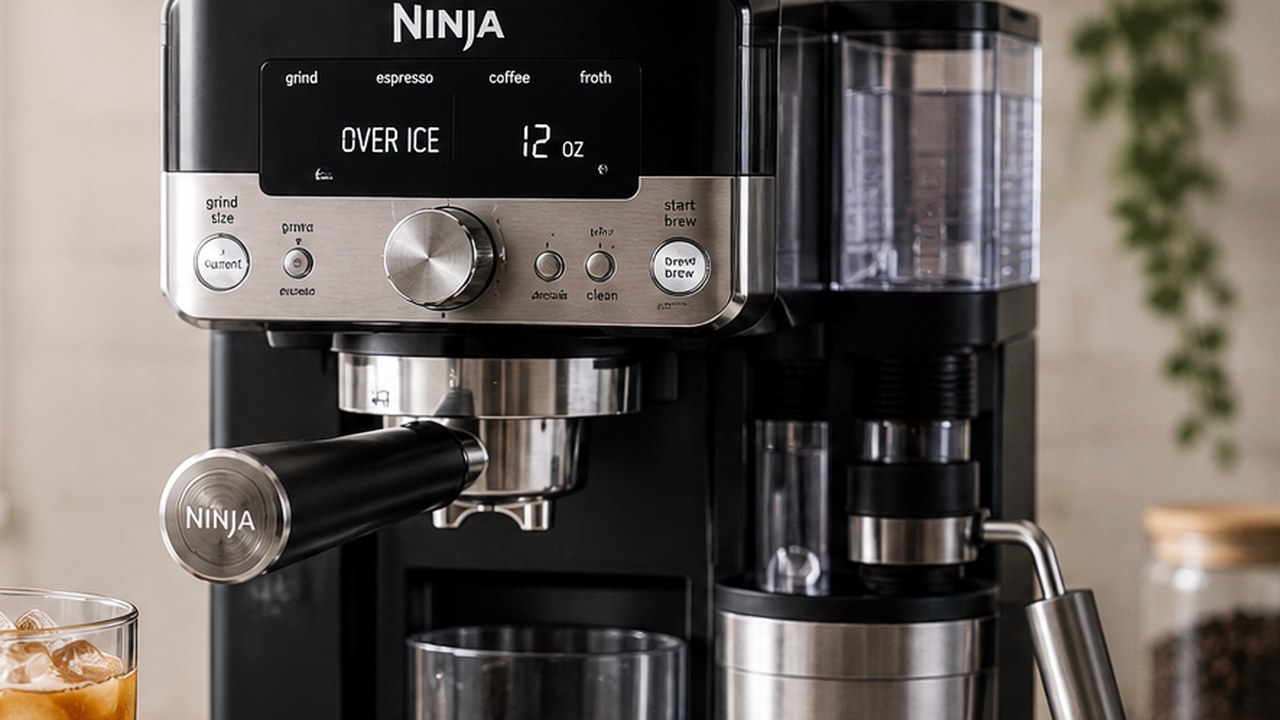
To make iced coffee with the Ninja Luxe Café Pro ES701, install the Luxe basket, select OVER ICE, choose your drink size, follow the Barista Assist grind recommendation, grind the beans, prepare the grounds for the selected size, fill your serving glass with ice and press START BREW.
Over Ice is not the same as Cold Brew. The ES701 deliberately brews hot, concentrated coffee directly over ice so that melting ice brings the drink to the intended strength. Cold Brew, by contrast, uses a lower-temperature extraction for a smoother and naturally sweeter result.
Ninja Luxe Café Pro Over Ice at a glance
| Setting | What to use |
|---|---|
| Brew mode | OVER ICE |
| Basket | Luxe basket |
| Coffee | Fresh whole beans |
| Grind size | Follow Barista Assist |
| Available sizes | 6, 8, 10, 12, 14, 16 and 18 oz |
| Ice | Fill serving glass with ice before brewing |
| Brew temperature adjustment | Not available in Over Ice mode |
| 6–14 oz preparation | Lightly shake grounds level; no tamp required |
| 16–18 oz preparation | Tamp before brewing |
What does Over Ice mean on the Ninja Luxe Café Pro?
Over Ice is Ninja’s dedicated iced drip-coffee setting.
Instead of brewing an ordinary cup of Classic coffee and then dropping ice into it, the ES701 automatically prepares a stronger, more concentrated hot coffee intended to be diluted by the ice already waiting in your glass.
This matters because a normal-strength hot coffee can quickly taste watery once several ounces of ice begin melting. Over Ice compensates for that expected dilution during the brewing process.
How to make Over Ice coffee on the ES701
1. Install the Luxe basket
The ES701 uses the Luxe basket for its full-size coffee drinks, including Over Ice.
- Place the Luxe basket into the portafilter.
- Align its tabs with the portafilter notches.
- Press the basket down until it is correctly seated.
- Insert the portafilter straight into the grinding cradle.
Do not substitute the Single or Double espresso basket for the normal Over Ice coffee workflow.
2. Select OVER ICE
Turn the center dial until OVER ICE is illuminated.
Then use the SIZE control to choose your desired serving size before grinding. The ES701 offers coffee sizes from 6 oz through 18 oz.
Selecting the drink and size first is important because Barista Assist uses that information to determine how much coffee to grind.
3. Match the recommended grind size
Look at the grind-size recommendation shown on the control panel and turn the grinder dial until the current setting matches it.
Then press START GRIND.
The ES701 uses its built-in scale to dose by weight. Do not push on, lift or hold the portafilter while it is grinding because external pressure can interfere with the weighing process.
4. Shake or tamp depending on the size
Not every Over Ice serving needs to be tamped.
For 6, 8, 10, 12 and 14 oz coffee drinks, remove the portafilter from the grinding cradle and lightly shake it to level the grounds.
For 16 and 18 oz coffee drinks, Ninja recommends tamping the grounds. Leave the portafilter in the grinding cradle, pull the integrated tamper handle down until you feel resistance and release it. Tamp twice for an even coffee bed.
This is one reason you should not automatically treat every Luxe-basket drink like an espresso puck.
5. Fill your glass with ice before brewing
This is one of the most important steps.
Fill the serving glass with fresh ice before placing it under the portafilter. Ninja specifically designs Over Ice around the dilution produced as that ice melts.
If you brew into an empty glass and add only a few cubes afterward, the final drink will not match the concentration and temperature the program was designed to produce.
6. Lock in the portafilter
- Remove the prepared portafilter from the grinding cradle.
- Align it with the orange mark on the group head.
- Rotate it to the right until securely locked.
- Place your ice-filled glass underneath.
7. Press START BREW
Press START BREW and let the ES701 complete the program.
The coffee coming from the portafilter is supposed to be concentrated. As it hits the ice, some of that ice melts and dilutes the drink toward its intended final strength.
Why does the machine seem to brew less than the selected size?
This is normal with Over Ice.
The size displayed on the ES701 represents approximately the finished drink volume after ice melt, not necessarily the exact amount of liquid that leaves the portafilter before dilution.
So if you select a 12 oz Over Ice drink and the machine appears to dispense less than 12 oz of hot coffee, that does not automatically indicate a flow problem.
How much ice should you use?
Ninja’s guidance is simple: fill the cup with ice before brewing.
You do not need to count individual cubes or weigh the ice. Use a glass large enough for the selected brew size and fill it generously with fresh solid ice.
Using too little ice creates two problems at once: the coffee may finish warmer than expected, and the dilution will differ from what the Over Ice program anticipates.
Over Ice sizes: 6 to 18 oz
The ES701 offers seven coffee sizes:
- 6 oz
- 8 oz
- 10 oz
- 12 oz
- 14 oz
- 16 oz
- 18 oz
Remember the preparation change at the top end of that range: 6–14 oz drinks only need the grounds leveled with a light shake, while 16 and 18 oz coffee drinks should be tamped.
Can you change the temperature in Over Ice mode?
No. The ES701 does not make its normal brew-temperature adjustment available for Over Ice, Cold Brew or Cold-Pressed.
This is intentional because these programs already use temperature as part of their programmed brewing profile.
If you press TEMP/STRENGTH expecting to make Over Ice hotter or cooler and cannot access the normal Low, Medium or High temperature adjustment, the machine is behaving normally.
Can you adjust Over Ice strength?
The ES701 does allow strength adjustment for coffee drinks. Unlike espresso strength, which changes the water-to-grounds ratio, coffee strength changes how many beans are ground.
- Mild: fewer beans are ground.
- Default: standard coffee dose.
- Bold: more beans are ground.
If you consistently prefer a stronger iced coffee, Bold is the logical setting to test before changing grinder settings manually.
Over Ice vs. Cold Brew
These are two genuinely different ES701 programs, not two names for the same iced coffee.
| Over Ice | Cold Brew | |
|---|---|---|
| Extraction | Hot concentrated coffee | Lower-temperature extraction |
| Main flavor | Traditional iced-coffee character | Smoother, naturally sweeter |
| Ice required | Yes | Yes |
| Basket | Luxe | Luxe |
| Temperature adjustment | Unavailable | Unavailable |
| Traditional overnight steep | No | No |
| Best for | Classic iced coffee | Cold-brew-style coffee |
If you want the smoother lower-temperature drink, use our Ninja Luxe Café Pro Cold Brew guide. If you want a conventional iced coffee with a stronger hot-brewed flavor, Over Ice is the better choice.
Over Ice vs. regular coffee poured over ice
You can technically brew Classic coffee and pour it onto ice, but it is not the same process.
Classic is designed to taste balanced when consumed at its normal brewed concentration. Over Ice deliberately increases concentration to account for melting ice.
That is why Over Ice usually holds its flavor better as the drink cools and the ice begins to melt.
Is Over Ice the same as an iced latte?
No.
Over Ice is an iced coffee drink made with the Luxe basket and the drip-coffee side of the ES701.
An iced latte is normally built from espresso or cold-pressed espresso, milk and ice. You can add milk to Over Ice coffee if you enjoy it that way, but doing so does not turn the brewing method itself into a traditional iced latte. For the correct ES701 method, see our Ninja Luxe Café Pro iced latte guide.
Over Ice tastes watery
If the final drink tastes noticeably weaker than expected, start with the preparation rather than assuming the machine has a pump problem.
- Make sure you actually selected OVER ICE rather than Classic.
- Fill the glass with fresh ice before brewing.
- Use the Luxe basket.
- Match the grinder to the current Barista Assist recommendation.
- Do not interfere with the portafilter while the built-in scale is dosing.
- Tamp 16 and 18 oz servings as instructed.
- Try Bold coffee strength if you simply prefer a more concentrated flavor.
Old ice that is already wet and melting can also dilute a drink much faster than fresh solid cubes.
Over Ice tastes too strong
Remember that the coffee leaving the group head is intentionally concentrated.
If you taste it before enough ice has melted, it can seem much stronger than the intended finished drink.
- Use the full amount of ice.
- Allow the brew to finish completely.
- Stir the drink so melted ice and coffee are evenly mixed.
- If Bold is selected, return to Default or Mild strength.
Over Ice tastes bitter
Bitterness can come from the coffee itself or from extraction.
- Check that the grind dial matches Barista Assist.
- Use reasonably fresh beans.
- Try a medium roast if your current dark roast tastes too roasty over ice.
- Do not tamp 6–14 oz servings that only require leveling.
- Try Default strength if Bold is too intense.
Over Ice is not cold enough
The ES701 does not refrigerate the brewed coffee. Over Ice still uses hot coffee and relies on the ice in your glass to chill it.
- Fill the glass with ice before brewing.
- Use fresh solid cubes rather than partly melted ice.
- Use a cool serving glass if available.
- Do not expect the coffee leaving the machine to be refrigerator-cold.
If you specifically want a lower-temperature extraction rather than hot coffee chilled by ice, select Cold Brew instead.
Why is the grind recommendation different from espresso?
Over Ice uses the Luxe basket and a much larger coffee-drink dose than a normal Single or Double espresso.
Barista Assist therefore does not need to recommend the same grind number you use for espresso. Follow the recommendation shown for the current Over Ice drink instead of forcing your usual espresso setting.
Why did the recommended grind size change?
Barista Assist can update its recommendation as it learns how the current beans are extracting.
A changing recommendation is especially normal after switching to a new bag of beans or moving between espresso, full-size coffee and cold drinks.
Do not treat a changed grind number by itself as a grinder malfunction.
What if you make Over Ice immediately after a hot drink?
The ES701 may request a RINSE when moving directly from a hot drink to one of its cold-drink programs.
If RINSE appears, complete the requested rinse instead of bypassing it. The rinse helps prepare the brew system for the cold-drink profile.
Can you add milk or cold foam?
Yes. Over Ice can be used as the coffee base for a milkier iced drink.
You can add cold milk directly or prepare Cold Foam separately with the Dual Froth System Pro.
If you add a large amount of milk, consider using Default or Bold strength so the coffee flavor does not disappear behind the milk and melting ice.
Simple Ninja Luxe Café Pro iced coffee
A straightforward starting drink needs only:
- Fresh whole coffee beans.
- Fresh ice.
- Optional milk, cream or sweetener.
- Install the Luxe basket.
- Select OVER ICE.
- Select your preferred size.
- Match the grinder to Barista Assist.
- Press START GRIND.
- Lightly shake 6–14 oz doses or tamp 16–18 oz doses.
- Fill the serving glass with ice.
- Install the portafilter in the group head.
- Press START BREW.
- Stir after brewing.
- Add milk or sweetener if desired.
Common Over Ice mistakes
- Brewing Classic coffee instead of selecting Over Ice.
- Adding ice only after brewing.
- Using too little ice.
- Using the wrong basket.
- Ignoring the recommended grind size.
- Tamping smaller 6–14 oz coffee doses unnecessarily.
- Failing to tamp 16–18 oz coffee doses.
- Trying to manually change brew temperature in Over Ice mode.
- Assuming the machine should dispense the entire selected final volume before the ice melts.
ES701 Over Ice checklist
- Luxe basket installed.
- OVER ICE selected before grinding.
- Correct drink size selected.
- Grind dial matched to Barista Assist.
- 6–14 oz grounds lightly leveled.
- 16–18 oz grounds tamped.
- Glass filled with fresh ice before brewing.
- Portafilter fully locked into group head.
- RINSE completed if the ES701 requests it.
If those steps are correct, Over Ice should produce a deliberately concentrated hot brew that balances out as the ice melts. The key is not trying to prevent all dilution; the ES701 has already accounted for that dilution when it designed the brew profile.