
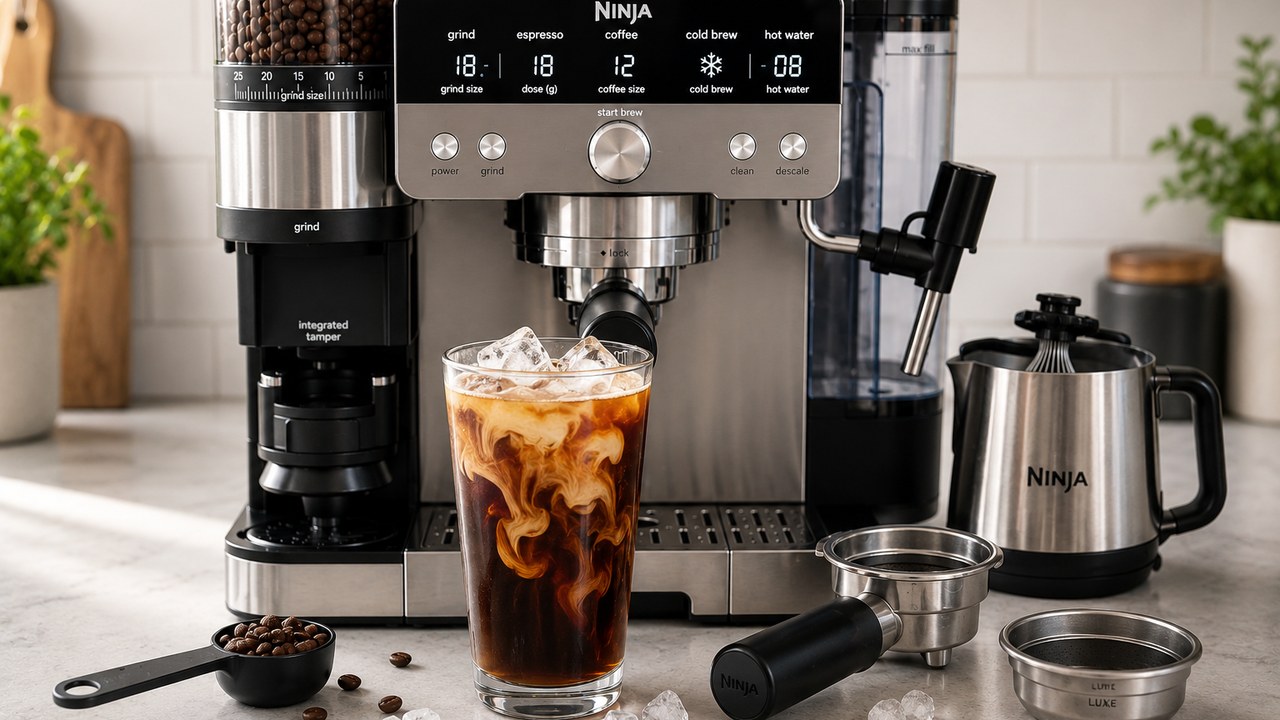
To make cold brew on the Ninja Luxe Café Pro ES701, use the Luxe basket, select COLD BREW, choose your drink size, follow the Barista Assist grind recommendation, grind the beans, level the grounds, fill the serving glass with ice and press START BREW.
The ES701 makes rapid cold brew. It brews at a lower temperature for a smoother, naturally sweeter result without requiring the 12–24 hour steep used for traditional cold brew. Depending on the selected size, the process can still take several minutes, so a slower brew is normal.
Ninja Luxe Café Pro cold brew at a glance
| Setting | Use |
|---|---|
| Drink mode | COLD BREW |
| Basket | Luxe basket |
| Coffee | Whole beans in the hopper |
| Grind | Follow the ES701 Barista Assist recommendation |
| Serving glass | Fill with ice before brewing |
| Typical brew time | Several minutes; approximately 5–10 minutes depending on size |
| Milk option | Cold Foam or another desired froth style |
| Tamper | Not required for every size; larger cold brews may require tamping |
How to make cold brew on the Ninja Luxe Café Pro ES701
1. Install the Luxe basket
Cold Brew uses the Luxe basket rather than the Single or Double espresso baskets.
- Place the Luxe basket into the portafilter.
- Make sure its tabs align with the portafilter notches.
- Press it down until it is correctly seated.
- Place the portafilter level in the grinding cradle.
The Luxe basket is designed for the larger coffee doses used by the ES701’s coffee and cold-brew programs.
2. Select COLD BREW
Turn the center dial until COLD BREW is selected.
Use the SIZE control to choose how much cold brew you want before grinding. Select the drink first because the ES701 uses that information when calculating the required coffee dose.
3. Follow the recommended grind size
Barista Assist will display a recommended grind setting for the beans and drink you selected.
- Look at the recommended grind number on the display.
- Turn the grind-size dial until the current setting matches the recommendation.
- Press START GRIND.
The integrated scale measures the dose by weight, so do not push down on or hold the portafilter while the machine is grinding.
4. Level the coffee grounds
For the normal cold-brew sizes, remove the portafilter from the grinding cradle and give it a light shake to distribute the coffee more evenly across the Luxe basket.
Do not aggressively shake or compress the coffee when only leveling is required.
5. Tamp when required for a larger cold brew
The ES701 Pro has an integrated tamper, but cold brew does not require the same puck preparation for every drink size.
Ninja’s Pro brewing guidance specifies tamping for its larger cold-brew servings. If the selected size calls for tamping, leave the portafilter in the grinding cradle and pull the integrated tamper lever firmly through its full movement before brewing.
For a smaller serving where Ninja calls only for leveling, a light shake is sufficient.
6. Fill your glass with ice
Put ice in the serving glass before starting the cold-brew cycle.
The drink is designed to finish over ice. Starting with an empty room-temperature glass and adding only a few cubes afterward can give you a warmer and less refreshing result.
Use a glass large enough to hold both the selected brew volume and the ice without overflowing.
7. Lock the portafilter into the group head
- Move the prepared portafilter from the grinding cradle to the group head.
- Align the orange marks.
- Rotate the portafilter to the right until it is securely locked.
- Place the ice-filled glass underneath.
8. Press START BREW
Press START BREW and allow the ES701 to complete the cold-brew program.
Do not be surprised if it takes much longer than an espresso. Ninja’s cold-brew guidance gives an approximate range of 5–10 minutes depending on drink size.
The lower-temperature extraction and longer contact time are part of how the machine produces a smoother cold coffee rather than simply pouring normal hot coffee onto ice.
Cold Brew vs. Over Ice: they are not the same
The ES701 can make different types of cold coffee, and the terminology matters.
| Cold Brew | Over Ice | |
|---|---|---|
| Temperature | Brews at a lower temperature | Uses a hotter concentrated coffee brew |
| Flavor | Smoother and naturally sweeter | More like conventional iced coffee |
| Brew time | Longer | Faster |
| Ice | Brew over ice | Brew over ice |
| Traditional 12–24 hour steep | No | No |
If you want the smooth flavor associated with cold brew, select COLD BREW. If you want a quicker conventional iced coffee, use the ES701’s Over Ice mode instead; our Ninja Luxe Café Pro Over Ice guide explains the correct basket, grind, ice, sizes and how to avoid watery iced coffee.
Is Ninja rapid cold brew real cold brew?
It is better described as rapid machine-brewed cold brew rather than traditional immersion cold brew.
Traditional cold brew usually leaves coarse grounds in cold water for many hours. The ES701 instead controls grind size, coffee dose, water temperature and brewing time to produce a cold-brew-style extraction in minutes.
That means the flavor can resemble cold brew without requiring you to prepare a concentrate the night before.
Why does Ninja cold brew take 5–10 minutes?
That longer brew time is normal.
Cold Brew is intentionally slower than espresso because the ES701 is extracting coffee at a lower temperature. Lower-temperature water extracts flavor differently and requires more time than a hot espresso shot.
Do not cancel the cycle just because the machine appears much slower than it does when preparing espresso.
Should you tamp Ninja Luxe Café Pro cold brew?
Not for every size.
For normal cold-brew servings, Ninja instructs you to lightly shake the portafilter to distribute the grounds. Its Pro inspiration guidance calls for tamping when preparing the larger cold-brew sizes.
This is why treating Cold Brew exactly like an espresso puck can be a mistake. Use the preparation method appropriate to the selected size rather than automatically tamping every dose.
What grind size should you use?
There is no single grind number that is correct for every bag of coffee.
Use the number recommended by Barista Assist for the beans and Cold Brew selection currently loaded into the ES701.
The recommendation can change as the system learns how your coffee is extracting. A changed grind recommendation is therefore not automatically a sign that something is wrong with the grinder.
For a broader explanation of the ES701 controls and Barista Assist, see our Ninja Luxe Café Pro manual guide.
Can you make cold foam with the ES701?
Yes. The Pro’s Dual Froth System includes Cold Foam as one of its five frothing presets.
- Add milk or a plant-based alternative to the XL milk jug.
- Stay within the recommended fill markings.
- Place the jug correctly on its platform.
- Lower the steam wand into the jug.
- Select DAIRY or PLANT-BASED to match the milk.
- Select Cold Foam.
- Start the frothing program.
Cold Foam is intentionally not heated.
If the cold-foam cycle will not start or produces poor foam, use our Ninja Luxe Café Pro frother troubleshooting guide.
Simple ES701 cold brew with cold foam
A simple starting drink is:
- Your preferred fresh whole coffee beans.
- Ice.
- Milk or a plant-based alternative for optional cold foam.
- Install the Luxe basket.
- Select COLD BREW and your desired size.
- Match the grinder to the Barista Assist recommendation.
- Press START GRIND.
- Level or tamp the grounds as appropriate for the size.
- Fill the serving glass with ice.
- Lock the portafilter into the group head.
- Press START BREW.
- Prepare Cold Foam separately if desired.
- Pour the cold foam over the finished coffee.
Cold brew tastes weak
If the finished drink tastes unusually weak, do not immediately reduce the drink size or manually add extra grounds.
- Make sure you selected COLD BREW before grinding.
- Use the Luxe basket.
- Follow the current grind recommendation.
- Do not interfere with the integrated scale while grinding.
- Use reasonably fresh coffee beans.
- Make sure the ice has not already melted substantially before brewing begins.
A large amount of partly melted ice can also make an otherwise correctly brewed coffee taste diluted.
Cold brew tastes watery
Watery cold brew is often a combination of extraction and dilution.
- Use solid fresh ice rather than a small quantity of rapidly melting ice.
- Check that the selected drink size matches your glass.
- Follow Barista Assist instead of choosing an arbitrary coarse grind.
- Make sure the Luxe basket was used.
- Do not accidentally choose a standard coffee program when you intended Cold Brew.
Cold brew tastes too strong or bitter
If the drink is much harsher than expected:
- Verify that the current grind setting matches the recommendation.
- Do not tamp a serving size that only requires leveling.
- Try fresher beans or a roast you prefer for cold coffee.
- Check that you actually selected COLD BREW rather than another coffee mode.
A very dark roast can naturally taste more roasty or bitter even when the machine is operating correctly.
Cold brew is coming out warm
The ES701 does not refrigerate the coffee. Cold Brew uses lower-temperature brewing, but the final serving still relies on the ice in your glass to bring the drink to an appropriately cold serving temperature.
- Start with a generous amount of fresh ice.
- Use a cool glass if possible.
- Make sure COLD BREW is selected.
- Do not expect the liquid leaving the machine to be refrigerator-cold.
Making cold brew immediately after a hot drink
If the ES701 has just brewed a hot drink, residual heat remains inside the brew system.
Ninja’s Pro cold-drink guidance calls for a RINSE cycle when switching directly from a hot drink to a cold one. This helps prepare the machine for the lower-temperature brew.
If the machine asks for RINSE, complete it instead of ignoring the prompt and immediately starting Cold Brew.
Why did the recommended grind size change?
Barista Assist can refine its recommendation based on previous extractions and the drink being prepared.
Cold Brew also has different extraction requirements from espresso. A grind number you used successfully for an espresso shot is therefore not a reason to override the recommendation shown for Cold Brew.
Can you use pre-ground coffee?
The ES701’s normal guided Cold Brew workflow is built around whole beans, its integrated grinder, weight-based dosing and Barista Assist.
Using that workflow gives the machine control over both grind size and dose, which is particularly useful when switching between espresso, coffee and cold brew.
Do you need special cold-brew beans?
No special bean is required simply because you selected Cold Brew.
Start with fresh beans you already enjoy. Medium and medium-dark roasts are easy starting points, while lighter roasts can give a brighter and fruitier cold drink.
The more important first step is letting Barista Assist guide the grind and dose rather than assuming all cold brew requires the coarsest possible grinder setting.
ES701 cold brew checklist
- Luxe basket installed.
- COLD BREW selected before grinding.
- Correct drink size selected.
- Grinder matched to Barista Assist.
- Grounds leveled or tamped as appropriate for the selected size.
- Portafilter securely locked.
- Glass filled with fresh ice.
- RINSE completed first if the machine requests it after a hot drink.
- Cold Foam prepared separately if desired.
Once those steps are correct, the main thing to remember is that Ninja Luxe Café Pro Cold Brew is intentionally slower than espresso. Let the ES701 complete its lower-temperature extraction instead of treating the longer brew time as a fault.